Gym TV Systems 2026: The Complete Guide to Smart Gym TV Software
The complete guide to gym TV systems in 2026. Smart gym TV software vs Zoom Media GymTV vs Total Gym TV - what your gym TV should actually show. Compare options.
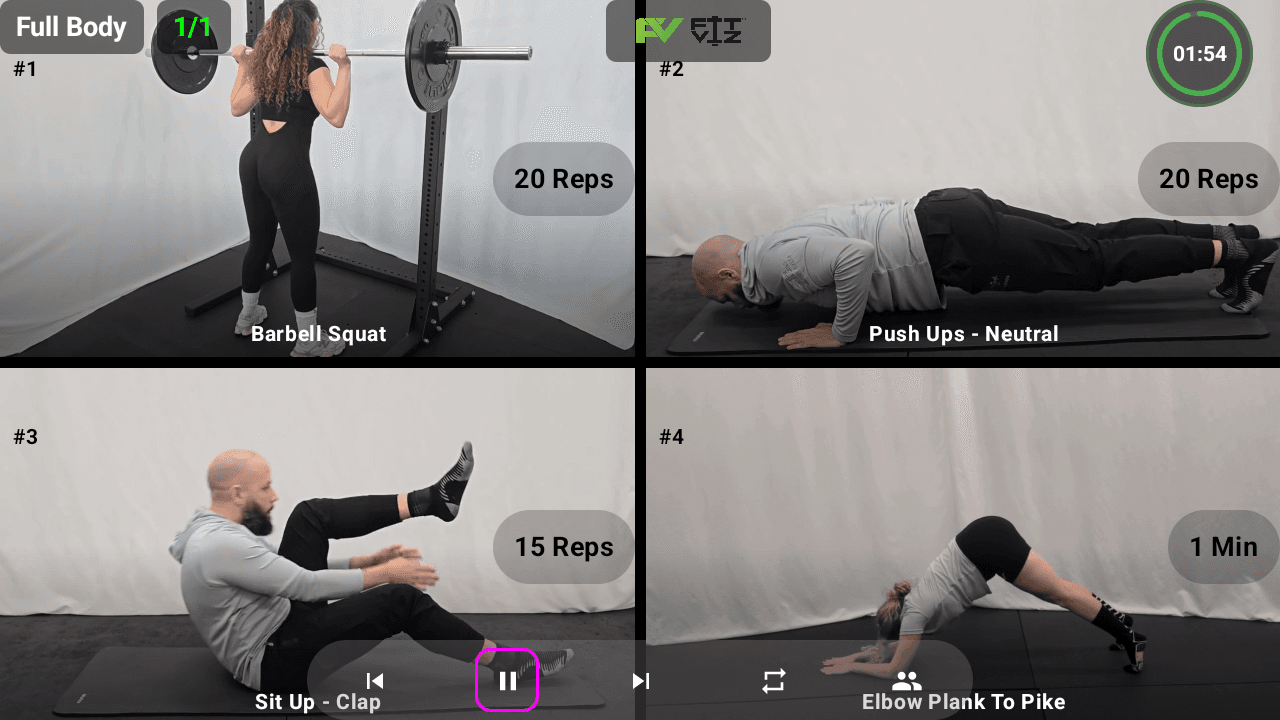
The gym TV has come a long way from background entertainment. Today's gym TV is the central in-class delivery surface - the screen members look at while they train, where workouts display, timers count down, and movement demos play in real time. But "gym TV" means very different things to different vendors: entertainment content providers (Zoom Media GymTV), streaming workout services (Total Gym TV, Get Healthy U TV), digital signage platforms, and purpose-built gym TV software that runs your class. This guide explains what each category actually does, why most gyms need gym TV software over entertainment content, and how the right smart gym TV system turns any TV in your facility into a coaching tool.
The three categories of gym TV solutions in 2026
Before comparing specific gym TV vendors, understand which category you actually need. Most confusion in gym TV buying decisions comes from vendors in different categories competing for the same search terms without doing the same thing.
Category 1: Gym TV entertainment content
Providers: Zoom Media GymTV, gymtv.online, generic cable subscriptions.
What it does: Plays music videos, sports highlights, news, or licensed content on gym TVs to give members something to watch on the treadmill, elliptical, or in the lobby. Members watch passively.
When it makes sense: Cardio-heavy facilities (24-hour globo gyms, hotel gyms, corporate gyms) where members work out solo on machines and want background entertainment.
When it doesn't: Class-based fitness - CrossFit, HIIT, boutique, functional training. Your gym TV during class shouldn't show music videos; it should show the workout members are doing.
Category 2: Streaming workout services
Providers: Total Gym TV, Get Healthy U TV, Peloton content licensing, iFit licensing.
What it does: Streams pre-recorded workout videos onto your gym TV or member TVs at home. Members follow along with an instructor on screen.
When it makes sense: Home fitness setups, small studios without live coaches, or as supplementary content for members between classes.
When it doesn't: Facilities with live coaching. If you have a coach in the room, the gym TV should support the coach's class - not compete with it by playing a different instructor's workout.
Category 3: Smart gym TV software (display + delivery)
Providers: Fit Viz, Wodify Kiosk+ (add-on), and a handful of niche gym display tools.
What it does: Turns your gym TV into an active coaching surface. Displays the workout your coach is running, integrated timer, movement demos, member rosters, heart rate zones, and multi-track scaling - all connected to your class booking and programming.
When it makes sense: Any facility running live classes. This is the category most modern gym operators actually need but often don't realize exists until they've paid for the wrong one.
The rest of this guide focuses on Category 3 - because that's what class-based fitness facilities need. If you specifically need entertainment content or streaming workouts, the vendors named above will serve you better than any gym display software.
Section 1 - Why generic gym TVs fall short
Most gyms started with TVs the same way most homes did: mounted on a wall, running cable news, ESPN, or a music video channel. That worked when gym TVs were just background. It doesn't work in 2026.
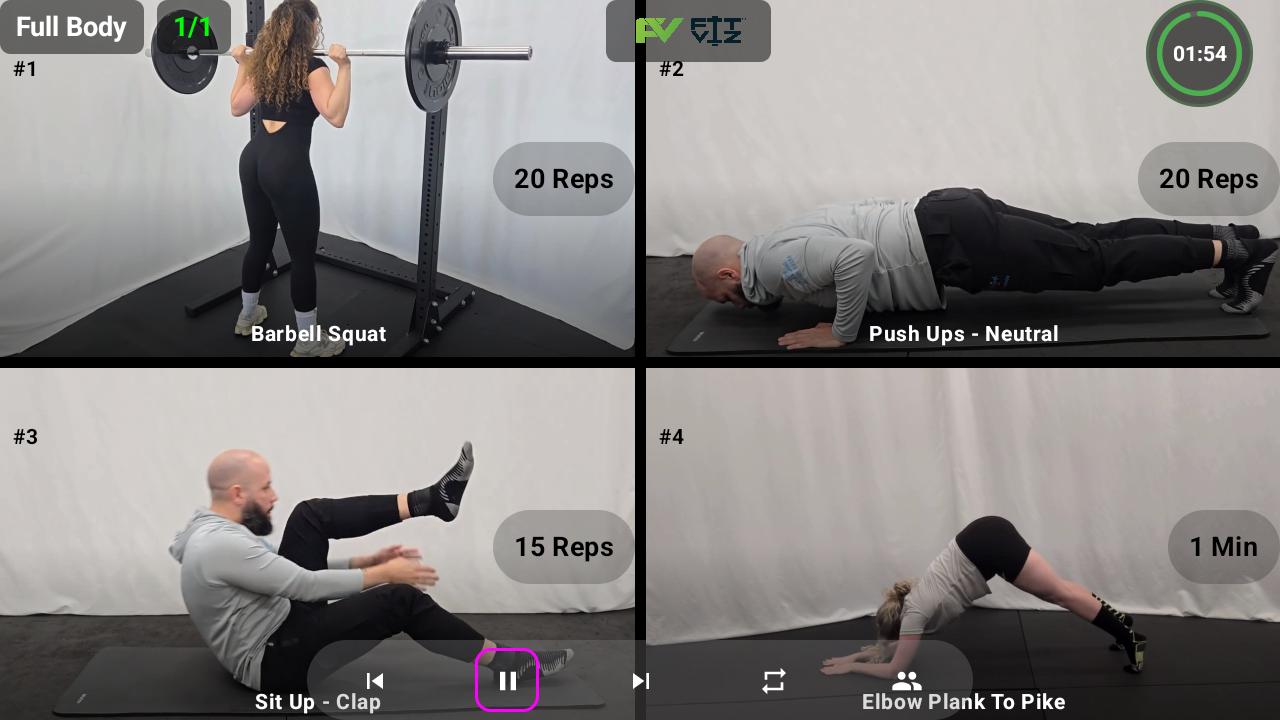
A modern fitness facility uses its gym TVs to:
- Display the workout structure (warm-up, strength, metcon, accessory)
- Run the workout timer (EMOM, AMRAP, Tabata, intervals)
- Show movement demos
- Show member rosters and check-ins
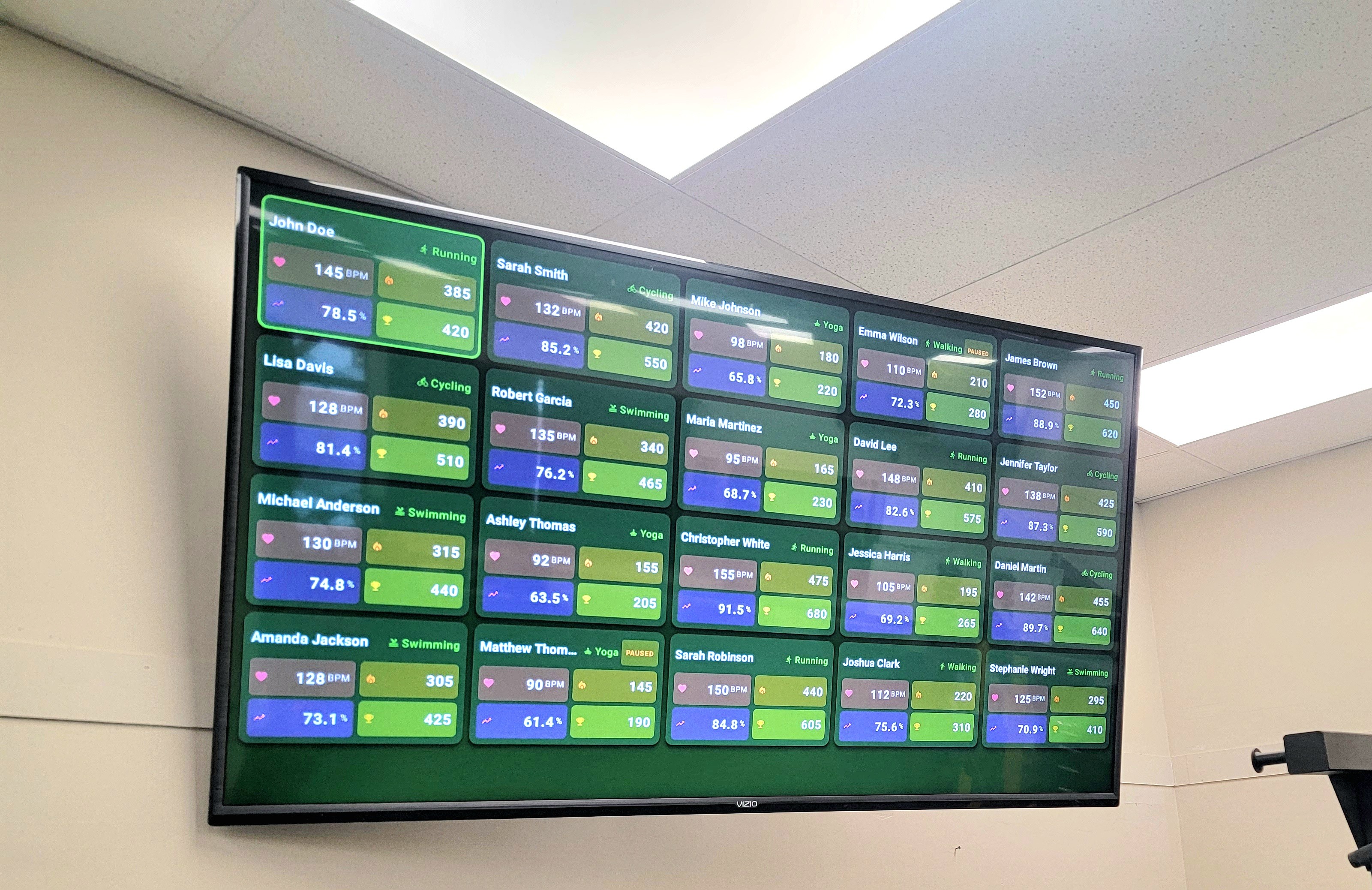
- Display heart rate zones
- Provide consistent visual branding
A generic gym TV running cable can't do any of that. A smart gym TV running purpose-built software does all of it without you switching apps. And entertainment services like Zoom Media GymTV or Total Gym TV - while genuinely useful for their intended purposes - don't display your workout, your timing, or your members. That's the gap this guide addresses.
Section 2 - What makes a TV a "smart gym TV"
A smart gym TV isn't a special hardware product - it's any modern TV running purpose-built gym software. The "smart" part is the system, not the screen.
To turn an ordinary gym TV into a smart gym TV, you need:
A browser-based gym display platform
Modern TVs all run web browsers. The cleanest setup is a gym TV system that runs in any browser - Chrome on a smart TV, a tablet, a streaming stick, even an old monitor. No proprietary hardware. No lock-in.
Workout-aware display software
Workout display software understands gym workflow: blocks, scaling options, transitions, station rotations. It doesn't try to show your workout as a slide - it shows it as a workout.
Integrated timing
The workout and the timer share one screen. Workout Timer modes (EMOM, AMRAP, Tabata, intervals, custom rounds) run inside the workout view, not on a separate device the coach has to manage.
Cast or push capability
One coach updates the workout from a phone, and every gym TV in the building updates instantly.
Multi-screen coordination
Lobby screen shows the day's schedule. Training floor screens show the active workout. Zone screens show station-specific instructions. All coordinated through one platform - see Gym Screens for the full multi-screen approach.
Section 3 - Gym TV use cases by class type
A smart gym TV delivers different value depending on the workout:
CrossFit / functional fitness
- WOD blocks (warm-up → strength → metcon → accessory) display in sequence
- Rx and scaled options side-by-side
- Integrated EMOM, AMRAP, Tabata timers
- Movement demos for complex lifts (snatch, clean, kipping pull-up)
- Cross-references to CrossFit software for full operations + display integration
HIIT and bootcamp
- Station-based displays for circuits
- Interval timer prominent
- Heart rate zone display (Heart Rate Zones) for intensity tracking
- Transition cues between stations
Yoga and Pilates
- Sequence display (poses or reformer setups)
- Calm visual style (no aggressive countdowns)
- Soft music coordination
- Instructor cue support
Personal training
- 1:1 session structure
- Movement demos for new exercises
- Progress display from previous sessions
- Branded client-facing screen
Boutique studios
- Branded display (your logo, your colors)
- Class roster + check-in animations
- Membership upsells between classes
Section 4 - Smart gym TV system features that actually matter
After watching hundreds of gyms evaluate gym TV systems, the features that separate "TVs running slides/PDFs" from real smart gym TVs:
Real-time editing
- One coach edits the workout, every screen updates within seconds
- No re-uploading, no re-pushing, no manual sync
Class-specific display
- 6 AM Rx class shows differently from 7 AM scaled class
- Automatic switch by class schedule
- No manual intervention between classes
Timer integration
- Built-in EMOM, AMRAP, Tabata, intervals, custom rounds
- No second app to launch
- Timer audio cues coordinate with the visual workout
Movement demo library
- Tap a movement → demo video plays
- Short loops, not full videos
- No buffering or streaming delays
Multi-track display
- Rx and scaled side-by-side
- Beginner / intermediate / advanced
- Different programming tracks within the same class slot
Branding control
- Your logo, your colors, your typography
- No vendor branding cluttering the display
- Looks like an extension of your facility
Cross-screen coordination
- Lobby, training floor, zone screens all synchronized
- Different content per screen, all from the same platform
Section 5 - Common gym TV mistakes
The six most common mistakes gym operators make with their gym TVs:
Mistake 1: Treating the gym TV as a sign. A static schedule, slide, or PDF on a gym TV is signage, not a smart gym TV. Members ignore it. Coaches still rewrite the whiteboard. You've spent money on a wall decoration.
Mistake 2: Buying signage software instead of gym display software. Signage tools (lobby menus, restaurant displays) don't understand workouts, timers, or scaling options. They show whatever you upload but can't run the class.
Mistake 3: Locking in proprietary hardware. A gym TV system that only runs on a special box you bought from one vendor is a future lock-in. Browser-based systems run on any TV, tablet, or monitor - your hardware investment isn't tied to one provider.
Mistake 4: Confusing gym TV entertainment with gym TV software. Zoom Media GymTV, gymtv.online, and similar services provide entertainment content (music videos, sports, licensed programming) for gyms. That's a real product for cardio-heavy facilities. But it's the wrong product for a CrossFit box, HIIT studio, or boutique fitness facility running live classes. Buying entertainment content when you need class-delivery software wastes budget and disappoints members.
Mistake 5: Buying streaming workout services for a coached class environment. Total Gym TV, Get Healthy U TV, and similar streaming services are excellent for home use or small facilities without live coaches. But playing a pre-recorded instructor on your gym TV during a class where you have a live coach in the room creates a jarring member experience. Your coach and the streamed instructor are competing for attention. Members disengage.
Mistake 6: Not integrating the gym TV with the rest of your operations. A gym TV that doesn't connect to your gym management software, your booking flow, or your class programming is a display, not a system. Modern gym TV software makes the screen an active piece of your operations - showing member names at check-in, displaying the scheduled workout automatically, updating when the coach edits programming. Isolated TVs are a lot of hardware without the software payoff.
Section 5A - Gym TV solutions compared: software vs entertainment vs streaming
To make the categories concrete, here's how the leading gym TV solutions actually compare:
| Solution | Category | What it does | Best for | Not for |
|---|---|---|---|---|
| Fit Viz | Smart gym TV software | Class delivery: workouts, timers, scaling, movement demos, member rosters | Class-based fitness (CrossFit, HIIT, boutique, functional) | Passive entertainment |
| Wodify Kiosk+ | Smart gym TV software (add-on) | Similar to Fit Viz but as add-on to Wodify operations | CrossFit affiliates on Wodify | Non-Wodify gyms |
| Zoom Media GymTV | Gym TV entertainment | Licensed music videos, sports, news content for gym TVs | 24-hour globo gyms, hotel gyms, corporate gyms | Coached class facilities |
| gymtv.online | Gym TV entertainment | Similar to Zoom Media - subscription entertainment for gym TVs | Cardio-heavy facilities | CrossFit / HIIT / boutique |
| Total Gym TV | Streaming workouts | Pre-recorded workout videos for Total Gym users | Total Gym equipment users, home fitness | Live-coached class settings |
| Get Healthy U TV | Streaming workouts | Pre-recorded workout videos, home fitness focus | Home use, small studios without coaches | Live-coached class settings |
| Cable/YouTube | Ambient background | Whatever's on TV | Not really a gym TV solution | Anything serious |
The strategic distinction: Entertainment and streaming vendors solve the "what plays on a gym TV" problem for passive-viewing contexts. Smart gym TV software solves the "how does the gym TV support today's class" problem for active-coaching contexts. Different products, different customers.
If you're running any coached class format, category 3 (smart gym TV software) is what you need. If you're running a 24-hour cardio-focused facility, category 1 or 2 fits better. Very few gyms need both.
Section 6 - How to evaluate gym TV systems in 2026
Before signing up for any gym TV system, check:
- Does the gym TV software run on TVs I already own?
- Does it update across all screens with one action?
- Does it include workout timer modes natively?
- Does it support multi-track classes (Rx + scaled)?
- Does it integrate with my gym management software or come with one?
- Can I display movement demos?
- Can I customize branding?
- Is the pricing per-screen or per-facility?
- Is this actually gym display software, or am I looking at an entertainment content service (Zoom Media, gymtv.online) that solves a different problem?
- Is this actually class-delivery software, or am I looking at a streaming workout service (Total Gym TV, Get Healthy U TV) meant for home use?
If a gym TV system answers no to more than two of the first 8 questions, it's not actually a smart gym TV - it's a TV with a slideshow. If it's actually a solution from questions 9 or 10, it may be excellent for its intended use case but wrong for a coached class environment.
Section 7 - From single gym TV to multi-screen ecosystem
Most gyms don't start with five TVs. They start with one, prove the value, then expand. A realistic growth path:
- Phase 1 (Days 1-30): One smart gym TV mounted on the training floor running workouts + timer
- Phase 2 (Days 30-60): Add lobby screen showing class schedule, check-ins, promotions
- Phase 3 (Days 60-90): Add zone screens for specialty classes (rowing erg, lifting platforms, conditioning)
- Phase 4 (Days 90+): Coach control view on tablet or phone, multi-location coordination if applicable
Fit Viz supports this evolution without forcing facilities into expensive enterprise signage contracts. See Gym Screens for the multi-screen approach.
Section 8 - Built for class-based fitness
A smart gym TV isn't just a nicer-looking screen. It's the visible piece of a coaching system - and when it connects to gym management software, workout timer, heart rate zones, and member rosters, it becomes the central interface between your gym and your members.