Gym Screens: Ultimate Guide to Gym Screen Systems
Modern gym screens are no longer just TVs on a wall — they're part of a complete gym screen system that shapes how members move through your facility and how classes run on the floor. From gym digital signage in the lobby to workout screens in the training room, the best setups make the experience clearer, faster, and more premium at every touchpoint.
The key is knowing what problem you're solving. Some gyms need better front-of-house communication: schedule boards, announcements, and wayfinding across fitness studio screens. Others need better in-class execution: workouts that are easy to follow at a glance, timed transitions, and fewer coach interruptions. And if you're thinking about a full gym TV system, reliability and consistency matter as much as what you display.
This guide breaks down both sides — signage vs workout display — so you can build screens that actually improve operations, coaching, and engagement. If you're here because you really mean "make my TVs run classes better," start with the workout display layer first (it's the highest-retention, highest-impact use of screens).
Fit Viz is a multi-screen gym digital platform that supports digital content + scheduling needs, including workout display and booking software under one ecosystem.
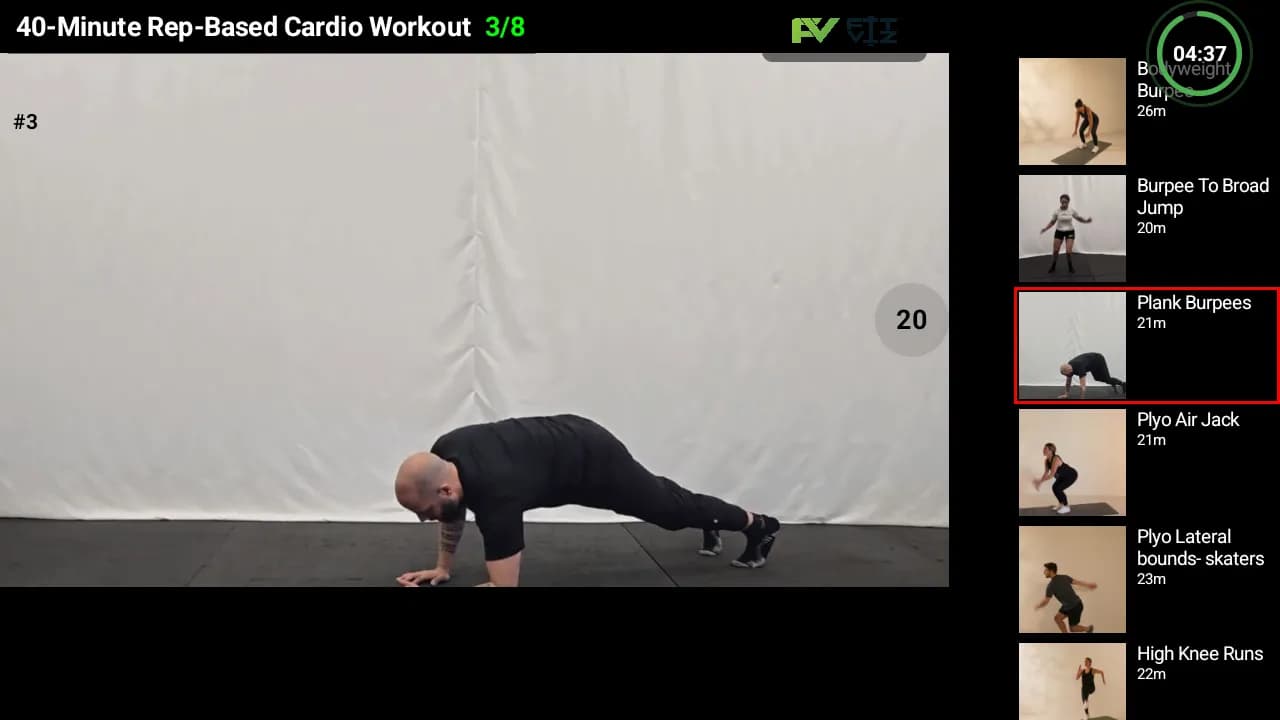
Turn Your Gym Screens Into a Workout Display System
Stop using TVs as "just TVs." Fit Viz turns any screen into a guided workout experience — structured blocks, timers, and clear visual instruction — so members always know what's next and coaches spend less time repeating demos.
What "Gym Screens" Means (And Why the Term Is Bigger Than You Think)
When people search "gym screens," they can mean any of the following:
Workout screens
Gym digital signage
Gym TV systems
Fitness studio screens
Performance displays
A true gym screen system includes four layers:
TVs/monitors + mounting + media players (if needed) + networking
Content control, scheduling, templates, multi-screen management
What you show (and what you don't show) to reduce confusion
Who updates screens, how often, and whether it's automated
The TV isn't the value — the automation is.
Gym Digital Signage vs Workout Screens: The Critical Difference
Understanding the difference between signage and workout display is key to choosing the right system.
Gym digital signage (front-of-house screens)
Digital signage exists to make the facility feel organized, welcoming, and easy to navigate.
- Reduce front desk questions
- Reinforce brand + professionalism
- Promote offers/events
- Create clarity for new members
Workout screens (on-the-floor display)
Workout screens exist to make coaching more efficient and execution more consistent.
- Clear workout structure that members can see from anywhere
- Timers and transitions built into the flow
- Movement demos and visuals to reduce repeated explanations
The best gyms connect both
Many gyms try to DIY the stack with separate tools — TV + timer app + Google Slides + separate roster/check-in app + printed signs. Fit Viz eliminates the constant manual work and fragmentation, all this functionality is built in our system.
Why Gym Screen Systems Matter (ROI Beyond "It Looks Cool")
A strong gym screen system pays off in three ways:
1. Faster, cleaner class flow
If your workout is visible, timed, and structured, classes start on time and feel "run," not improvised. Fit Viz is one ecosystem where scheduling and payment data connects to the in-studio workout experience.
2. Less coach repetition (more actual coaching)
Stop spending sessions shouting over noise and repeating the same demo over and over or constantly answering "What's next?"; Eliminate interruptions (by using visual workout TVs), let your coaches coach.
3. A more premium member experience
A facility that feels guided, legible, and consistent wins retention. Fit Viz's "Gym Software" is a "single source of truth" — who's booked, who's paid, who's present, what should be displayed right now.
The 7 Screen Types Every Gym Should Consider
You don't need all seven to start. But you do want to design intentionally so screens aren't random TVs with random content.
- STEP 0101
Welcome screen (lobby / entry)
Purpose: create instant professionalism and reduce "where do I go?" confusion.
Best content:
- Welcome message + daily schedule highlights
- Coach name + class room direction
- Reminders: check-in, footwear policies, late policy
Fit Viz's booking system keeps rosters accurate in real time, which supports low-friction arrival and real-time welcome visibility.
- STEP 0202
Schedule & room direction screens
Purpose: "what class is where, when, and who's coaching?"
- STEP 0303
Roster / check-in visibility screens
Purpose: eliminate roster ambiguity and last-minute scrambling.
When booking and payment are connected to the workout-floor experience, rosters update instantly and staff spend less time reconciling attendance.
- STEP 0404
Workout screens (main training floor)
Purpose: the "show" your members are paying for.
Fit Viz display content:
- WOD boards that update instantly (structured blocks, scaling, station layouts)
- Visual workouts (movement demos + workout visuals to reduce repeated explanation)
- STEP 0505
Timer screens (embedded, not separate)
Purpose: pace the room and remove "timer chaos."
Timers are no longer just about brightness — they're about connectivity and integration. Timers work best when the timer lives on the main screen and runs automatically as part of class flow.
- STEP 0606
Performance / engagement screens
Purpose: motivation, community energy, retention loops.
Fit Viz uses workout screens as a lever for motivation and retention (engagement), treating screens as part of the community experience — not just instruction.
- STEP 0707
Heart rate / intensity screens
Purpose: make effort visible and coach intensity intelligently. Heart rate zone overlays help members and coaches understand effort in real time.
Hardware: Choosing Gym Screens That Actually Work
You can't "software" your way out of bad placement and unreadable screens. Design for clarity first.
Screen size: design for the farthest class participant
A simple rule: choose screen size based on your farthest viewing distance and how much text you plan to show. If you cram too much programming onto one screen, the problem isn't the TV - it's the content layout.
TV vs commercial display: what matters in gyms
Most indoor, climate-controlled gyms can run reliable systems on standard modern TVs — but reliability is a function of consistent power, stable Wi-Fi / ethernet where possible, and a predictable content pipeline (no constant manual casting).
- Consistent power
- Stable Wi-Fi / ethernet where possible
- A predictable content pipeline (no constant manual casting)
Fit Viz's display-system guidance explicitly frames "screens aren't decoration — they're infrastructure," which is the right mental model for hardware decisions.
Placement: the "coaching triangle"
For group fitness, the highest clarity usually comes from a specific screen arrangement.
- 1 primary screen where the coach faces
- 1 secondary screen for athletes who face away (or for station-based layouts)
- Optional small screens for specific stations or specialty zones
Orientation: landscape vs portrait
- Landscape: best for timers, video demos, and wide room viewing
- Portrait: best for schedule boards, rosters, policies, and lobby signage
Audio: only if it improves clarity
If your timer cues or transitions benefit from audible cues, keep them minimal. Over-audio can backfire fast in boutique environments.
Software: What a "Gym Screen System" Should Do
A gym screen system is not PowerPoint on a TV.
Must-have capabilities
Fit Viz's Gym Display focuses on replacing the patchwork of timer apps + slide WODs + separate roster apps with integrated display infrastructure.
- Remote updates: change content without grabbing a remote or climbing a ladder
- Scheduling: different content at different times (pre-class vs in-class vs between classes)
- Templates: consistent layouts so members instantly "get it"
- Multi-screen management: push to one screen or many without chaos
- Automation hooks: tie screens to programming, timers, and (ideally) booking/rosters
Why integrated systems win
The best systems treat Workout TV as part of the class product — displaying the workout, running timers, showing demos, and optionally layering heart rate zones. When these are disconnected, you get seams: manual roster checks, late starts, and screens that don't match what's happening in the room.
Want Screens That Update Automatically From Your Schedule?
Gym screen systems work best when they're connected to operations. Fit Viz links booking + scheduling with in-gym displays — so that schedule screens, class rosters and the workout experience stay aligned without manual updates.
Content Strategy: What to Put on Gym Screens (Without Creating Visual Chaos)
Most gyms fail with screens for one reason: they show too much.
The "3-Layer" screen approach (simple, readable, scalable)
The key to effective gym screen content is layering information by priority.
- Layer 1: What is happening right now — workout block title, timer state (work/rest/transition), next movement and rep scheme
- Layer 2: How to do it correctly — movement demo video or a simple visual cue, a short coaching focus (1-2 cues max)
- Layer 3: Optional overlays (only if they help) — station numbers, scaling options, heart rate zone layer for intensity-based training
Digital signage content (front-of-house)
Keep signage content: short, big, rotating slowly, designed for "glance comprehension." If you're a yoga or boutique studio, the "calm" factor matters even more — your screens should support the studio vibe, not turn it into an airport terminal.
Step-by-Step: How to Roll Out a Gym Screen System (Without Breaking Operations)
Start where screens will remove the most friction:
- Busiest group class room
- Most confusing programming format
- Highest "new member" traffic
The fastest win is usually:
- Workout screen + integrated timer
- Schedule / roster clarity screen
Fit Viz ties these together as a unified system rather than separate projects.
Fit Viz eliminates repeated explanations and reduces manual prep time weekly through structured display workflows.
Your screens should work even when:
- The "tech person" isn't there
- A sub coach is running class
- The gym is slammed at 6am
Because the training floor drives retention.
Common Gym Screen Mistakes (And How to Fix Them)
Mistake 1: "We bought TVs, now what?"
TVs are hardware. Your real system is the workflow + software.
Mistake 2: Relying on a coach's phone + casting
In group environments, casting creates inconsistency (notifications, disconnects, dependence on one person). Fit Viz's display-system guidance frames integrated on-screen timing as the better approach for class flow.
Mistake 3: Using slides as a pseudo-software product
Slides don't:
- Run timers
- Adapt layouts
- Connect to rosters
- Scale across multiple screens cleanly
The slide WOD approach is part of the "patchwork" problem.
Mistake 4: Confusing entertainment TVs with workout TVs
A Netflix TV isn't a coaching tool. Fit Viz's booking software keeps class rosters and schedules connected to the training floor, not just to what's playing on a screen.
Where Fit Viz Fits: Turning Gym Screens Into a Real System
At Fit Viz we have positioned ourselves as a multi-screen gym digital platform — supporting digital content and scheduling requirements and automating workout programming so coaches spend less time preparing and explaining.
1. Workout screens / Workout Display
Fit Viz workout display is the end of whiteboard chaos — turning any screen into a digital coaching assistant. Fit Viz works with existing TVs/tablets, fast setup, and reduces repetitive explanation with video instruction.
2. Operational signage screens / Gym Screens
Fit Viz's Gym Display content explicitly includes:
- Schedule screens + class rosters
- Check-in visibility and operational flow
- Cleaner facility look with fewer printed signs
Why the "unified ecosystem" matters
Fit Viz's "Ultimate Guide to Gym Display Systems" spells out the broader system argument: gyms often stitch together TVs, timers, apps, booking tools, tracking tools — and Fit Viz replaces that patchwork with one platform that includes workout display, integrated timers/class flow, and booking software capabilities.
What "success" looks like with Fit Viz
We don't measure success by features. We measure it by:
Less admin, more coaching
Habits formed, churn reduced
Smarter, simpler, scalable
Related Fit Viz Articles/Posts
Display Systems
- Gym Display: Gym Display System for WODs, Gym Timers, WOD Boards, and Gym Signage
- Ultimate Guide to Gym Display Systems
- Digital Fitness Whiteboard & WOD Display
- Gym Whiteboard: Digital Gym Whiteboard to Replace a White Board
- Workout Clock Timers: Complete Buying Guide
- Workout Stations: How to Run Station-Based Training Without Confusion
- Gym Tech Stack: Workout Screens, Heart Rate Zones, and Class Scheduling
Workout TV
- Booking Software: Class Scheduling and Payments
- Engagement with Workout Screens: The Future of Motivation
- Life Fitness Treadmill Screens: Models, Features, and Smarter Alternatives
- Member Retention: Why Clarity Beats Motivation Alone
- Workout Display: What to Show on Gym TVs (and What to Avoid)
- Workout Templates: How to Build a Weekly Workout Routine That Scales
- CrossFit Gym Management Software: Top Picks
Booking & Operations
Performance
- Heart Rate Zones Explained: Understanding the Display
- WOD Tracking App Buyer's Guide (screens + timers connection)
- DEKA vs MURPH Challenge: Which Test of Fitness Is for You?
- AMRAP, EMOM, and Tabata: Which Workout Format Is Best?
- Hyrox Workout: Training and Preparation for a Hyrox Race
- Obstacle Race Explained: Spartan Race vs Hyrox
Frequently Asked Questions
The best gym screen system is the one that’s easy to update, consistent across coaches, and automated where possible — especially timers, class flow, and workout display. Fit Viz emphasizes moving away from disconnected DIY stacks toward integrated systems where screens are infrastructure.
Not exactly. Digital signage is typically front-of-house clarity and marketing. Workout screens are coaching and class execution. Fit Viz treats both as part of a complete gym display system, but they serve different jobs.
Often, no — if your screen system includes integrated timers and automated transitions. Fit Viz’s timer guidance pushes the industry toward connected, integrated timing rather than standalone hardware-only timers.
Yes. Fit Viz works with existing TVs, tablets, or monitors, and many trainers are displaying workouts quickly with onboarding support.
Ready to upgrade your gym screens?
Stop treating TVs like decoration. Turn them into the most valuable coaching tool in your facility. Fit Viz makes it easy.