Free Interval Timer, Exercise Timer, Workout Timer & Stopwatch
No sign-up requiredJump to a Dedicated Timer Format
Tabata Timer
20 seconds work, 10 seconds rest, 8 rounds - the classic anaerobic protocol.
Tabata timer →HIIT Timer
Configurable work and rest intervals for high-intensity interval training.
HIIT timer →Boxing Round Timer
3-minute rounds, 1-minute rest, and the classic 10-second warning bell.
boxing round timer →EMOM Timer
A fresh work window every minute, with rest built into your pace.
EMOM timer →Gym Timer Formats: HIIT, Tabata & EMOM Timer
A great workout timer doesn't just count down - it runs your room. Whether you're searching for a gym timer for group classes or an exercise timer for intervals, you're really looking for the fastest way to create structure, reduce confusion, and keep training intensity on track.
But here's the truth: gyms learn the hard way: a timer is only "simple" until you're scaling classes, adding coaches, juggling formats (EMOM, Tabata, intervals), and trying to keep sessions on schedule without killing the vibe.
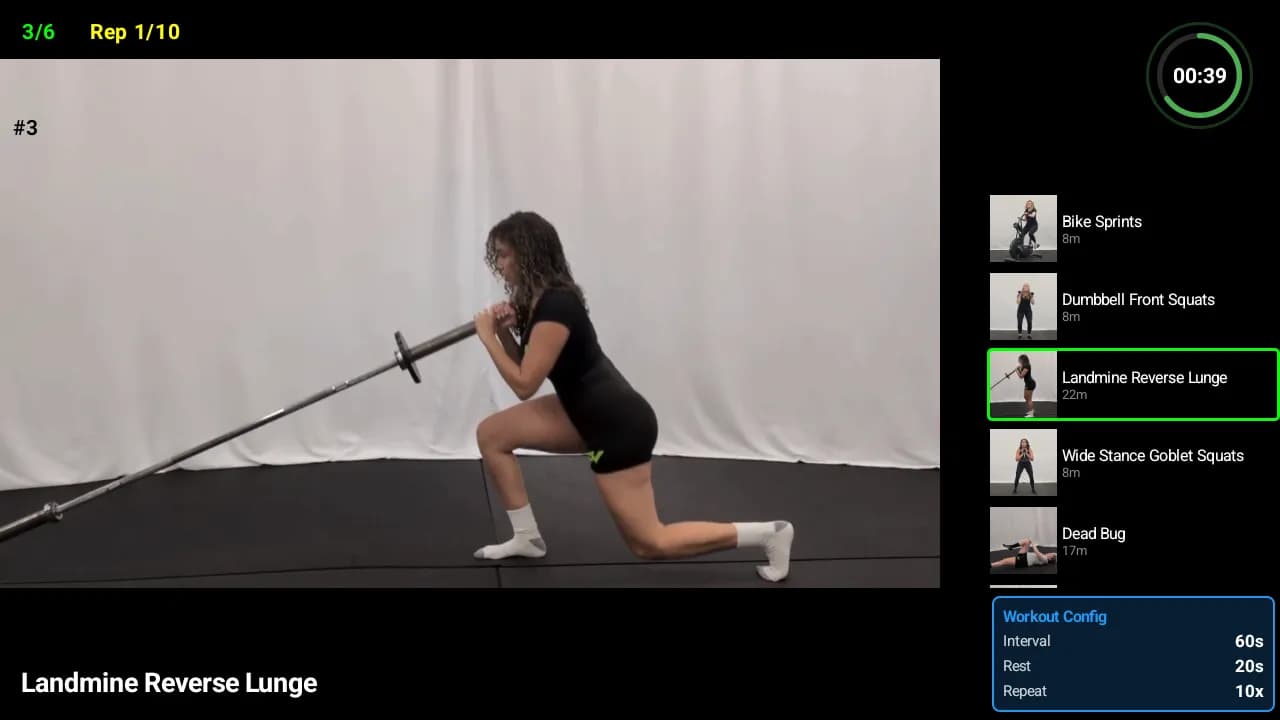
Fit Viz was built to solve that exact gap - turning your workout timer into a modern display system that guides every class, every session, and every transition without adding more headaches to your coaching staff.
What a Workout Timer Is (and Why Gyms Need More Than a Stopwatch)
At the surface level, a workout timer displays:
- Time remaining (count down) or time elapsed (count up)
- Round or interval markers
- Work vs rest indicators
- Optional sound or visual cues for transitions
But what you really need is:
- Repeatable class rhythm (the timer runs the session, not the coach)
- Reduced logistics (no setup delays, no coach guessing)
- Member clarity (instant visibility of what to do and when)
- Format flexibility (intervals, EMOMs, Tabata, custom structures)
Workout Timer vs Gym Timer vs Exercise Timer
Workout Timer
A general term for any timer used to structure training - intervals, circuits, or full sessions. Usually supports multiple formats and customization.
Gym Timer
A timer designed for group fitness environments - emphasizing visibility, durability, and coach control. Often wall-mounted or screen-based.
Exercise Timer
A timer focused on individual or small-group workouts - typically app-based or phone-controlled, with less emphasis on large-screen visibility.
Why Timers Matter (Performance, Coaching, and Operations)
Pacing Creates the Stimulus
- Intervals force output: 30 seconds on / 15 off creates very different stimulus than "go hard, then rest"
- EMOMs manage density: Every minute on the minute forces consistent work capacity
- Tabata drives anaerobic threshold: 20/10 structure creates specific metabolic demand
Less Logistics, More Coaching
Without a reliable timer, coaches have to:
- Manually track intervals while cuing movement
- Answer "how much time left?" mid-session
- Manage transitions manually (start/stop, round calls)
- Deal with setup delays or timer malfunctions
Consistent Class Flow Is a Business Advantage
- Members know what to expect: Same structure across coaches builds trust
- Classes start and end on time: Critical for back-to-back sessions
- Scaling improves: Adding coaches and rooms becomes easier with standardized timing
Workout Timer Types (LED, App, Remote, and Screen-Based Systems)
Remote-Controlled LED Gym Timers
Pros
- Extremely bright and visible
- Durable and reliable
- Simple remote control operation
- No screen setup required
Cons
- •Single-purpose hardware (only shows time)
- •Expensive upfront cost ($300-$800)
- •Limited format flexibility
- •Can't display workout context or instructions
Phone/Bluetooth Controlled Timers
Pros
- More flexible control via smartphone app
- Can save custom timer formats
- Eliminates lost remotes
Cons
- •Bluetooth connectivity issues
- •Still single-purpose LED display
- •App updates required
Workout Timer Apps
Best For
- Personal training or small groups
- Low-cost testing of timer formats
- Home workouts or outdoor sessions
- Coaches who need timer on their phone
Limits
- •Phone screen too small for group visibility
- •Battery and screen-lock issues
- •Inconsistent experience across coaches
- •No integration with workout display or scheduling
Stopwatch with Lap
The simplest timer - just starts, stops, and records lap times. Common use cases:
- Timed for-time workouts (AMRAP, chipper, hero WODs)
- Benchmark tests (max effort runs, rows, or circuits)
- Open gym or self-paced sessions
- Competition or leaderboard tracking
Screen-Based Timer Systems (Modern Standard)
Why they're winning:
- Multi-purpose: Timer + workout display + coaching visuals in one system
- Flexibility: Any format (intervals, EMOM, Tabata, custom) without hardware limits
- Lower cost: Use existing TVs/monitors instead of dedicated LED hardware
- Integration: Can connect to booking, scheduling, and workout tracking systems
Workout Timer Formats (Intervals, EMOM, Tabata, Laps, and Cycle Timers)
Interval Timers and Repeating Timers
The most common format: alternating work and rest blocks. Use cases:
- HIIT classes (30 on / 15 off, 40/20, etc.)
- Circuit training with timed stations
- Boxing or kickboxing rounds (3 min work / 1 min rest)
- Bootcamp or functional training blocks
Requirements: Clear visual distinction between work and rest, audio cues for transitions, round tracking.
EMOM Timer
Every Minute On the Minute - a work capacity staple. Why they work:
- Forces consistent pacing (can't slow down between rounds)
- Rest is built-in (finish fast = more rest)
- Easy to scale (adjust reps or movement complexity)
- Simple to understand and execute
Support needs: Clear minute markers, audio cues at start of each round, round count display.
Tabata Timer App
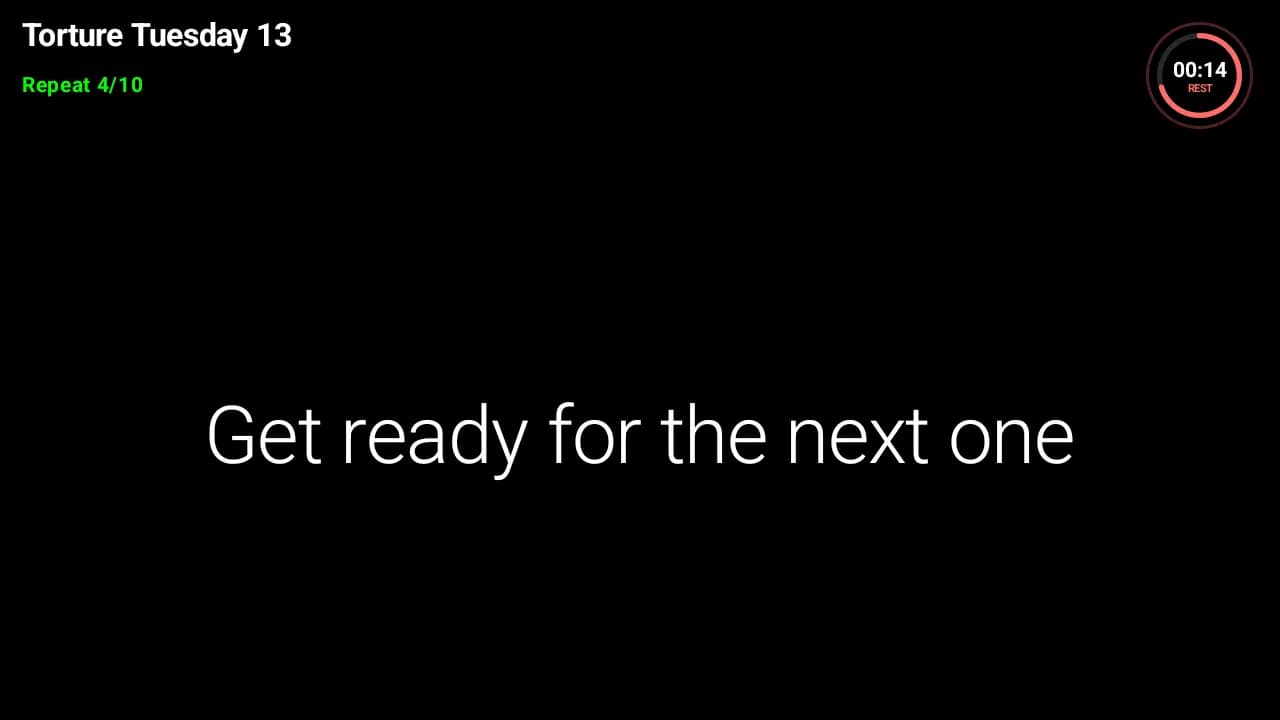
The 20/10 protocol: 20 seconds max effort, 10 seconds rest, 8 rounds. Original structure from Dr. Izumi Tabata's research on anaerobic capacity.
Requirements:
- Precise 20/10 timing (no manual start/stop)
- Loud audio cues (sessions get intense)
- Round counter (members lose track fast)
- Color-coded work vs rest display
Stopwatch with Lap
Use cases:
- For-time workouts (AMRAP, chippers)
- Benchmark tests and leaderboards
- Competition events
- Self-paced open gym sessions
Cycle Timer
Built for spin, rowing, or rhythm-based classes. Use cases:
- Cadence blocks (fast spin, climb, recovery)
- Sprint intervals with structured recovery
- Rowing erg workouts with stroke rate changes
- Music-synced fitness classes
Key needs: High visibility (loud music, low lights), clear transitions, tempo/cadence guidance.
Streamline scheduling + class flow
See how Fit Viz connects booking software and workout display in one system
How to Choose the Best Gym Timer (Buyer's Checklist)
Visibility
Can everyone read it?
- • Screen size vs room dimensions
- • Brightness in different lighting
- • Viewing angles from all stations
- • Font size and contrast
Reliability
Does it fail during peak?
- • Uptime track record
- • Setup time before class
- • WiFi/connection dependencies
- • Backup options if it fails
Control Method
Remote vs App vs Automated
- • Lost remote problems
- • Bluetooth reliability
- • Multi-coach access
- • Pre-programmed workflows
Format Support
Intervals, EMOM, Tabata, Rounds
- • Custom interval structures
- • Work/rest color coding
- • Round counters
- • Audio cue options
Context
Does it show what to do, not just time?
- • Movement names or demos
- • Rep schemes
- • Coaching cues
- • Next-up previews
Integration
Does it connect to scheduling/rosters?
- • Booking system sync
- • Workout library access
- • Member data tracking
- • Multi-room coordination
Setup Guide: Installing a Gym Timer System That Works
- Center of the room or front wall: Everyone needs instant visibility without turning around
- Height matters: Eye-level when standing is ideal; too high = neck strain
- Avoid glare zones: Windows and overhead lights create readability problems
- Test from floor positions: Check visibility from plank, burpees, and rowing stations
Screen considerations: LED timers are bright but limited. Screen-based systems need 50"+ TVs for rooms over 1500 sq ft, 65"+ for larger spaces.
If you run multiple rooms, standardization prevents chaos:
- Same timer system in each room (coaches don't re-learn)
- Centralized control (update all timers from one dashboard)
- Schedule sync (avoid class overlap or time confusion)
Reduce "it worked yesterday" problems:
- Hardwired Ethernet > WiFi (especially for screen-based systems)
- Bluetooth timers need line-of-sight and charged devices
- Offline fallback mode (timer keeps running if internet drops)
- Dedicated display device (don't rely on coach's personal phone)
The Modern Timer System (Timer + Workout Display + Booking + Engagement)
Why Integrated Timers Outperform Standalone Clocks
- Context matters: Showing "3:00" means nothing unless members know what movement they're doing
- Pre-class clarity: Members see workout structure before they start (reduces anxiety, improves prep)
- Coaching support: Display shows demos, cues, or scaling options alongside timing
- Scheduling sync: Timer auto-loads based on class roster and time slot
- Post-class tracking: Members log results, scores, or progress immediately
How the Fit Viz Platform Connects the Stack
Booking Software manages scheduling
Class rosters, capacity, member check-ins
Workout Display shows session structure
Movement names, rep schemes, coaching notes
Timer runs the clock
Intervals, EMOMs, Tabata, or custom formats
Engagement features capture results
Leaderboards, progress tracking, member feedback
Training Formats & Event Days
Next Steps (Choose Your Path)
Just need a solid timer
Start with Fit Viz's free tier - screen-based timer with intervals, EMOM, and Tabata support.
See PricingUpgrading in-gym experience
Timer + workout display + engagement features in one system.
See Workout DisplayFixing class flow as operator
Integrated booking + scheduling + timer + display platform.
See Booking SoftwareFrequently Asked Questions
The best workout timer for a gym is the one your members can see instantly and your coaches can run consistently - especially for intervals, EMOMs, and Tabata. Many gyms are moving from standalone LED clocks to screen-based systems because screens can show both timing and workout context.
Yes - LED wall timers are still common because they're bright and durable. But gyms are increasingly questioning single-purpose hardware when screens can provide timing plus workout instructions, demos, and updates in one system.
An interval timer runs fixed work/rest blocks (like 45 seconds on / 15 off). An EMOM timer starts a new "work window" every minute, forcing consistent pacing and managing rest as a built-in constraint.
A Tabata timer app works for the 20/10 structure, especially for small sessions. But in larger classes, visibility and context become the issue - members often need to see both timing and what movement they're doing next.
Cycle timers are used in spin and rhythm-based classes to run cadence blocks, sprints, climbs, and recoveries. The key is visibility and clear transitions under loud music and high intensity.
If you run group classes, integration matters more than most owners expect. Scheduling and rosters influence class flow, station assignments, transitions, and how organized your room feels - especially at peak hours.
Fit Viz positions itself as a modern alternative: instead of mounting a dedicated LED clock, gyms use TVs/monitors that display the timer alongside workout context and coaching visuals.
Stop counting. Start coaching.
Fit Viz replaces your workout timer with a modern display system that runs your classes, guides your members, and supports your coaches - without adding complexity to your operations.