Gym Workout Display SystemElevate Group Training with Workout Displays for Gyms, Timers & Heart Rate Zone Displays
The modern gym floor isn't a place for scribbled whiteboards, half-heard instructions, and "wait - what are we doing next?" moments. A Workout Display turns any screen into a digital coaching assistant so members know what to do, coaches stop being timekeepers, and workout delivery becomes consistent from the first warm-up minute to the last finisher rep. A Gym Workout Display doesn't just make the gym room look premium - it makes the gym class run premium.
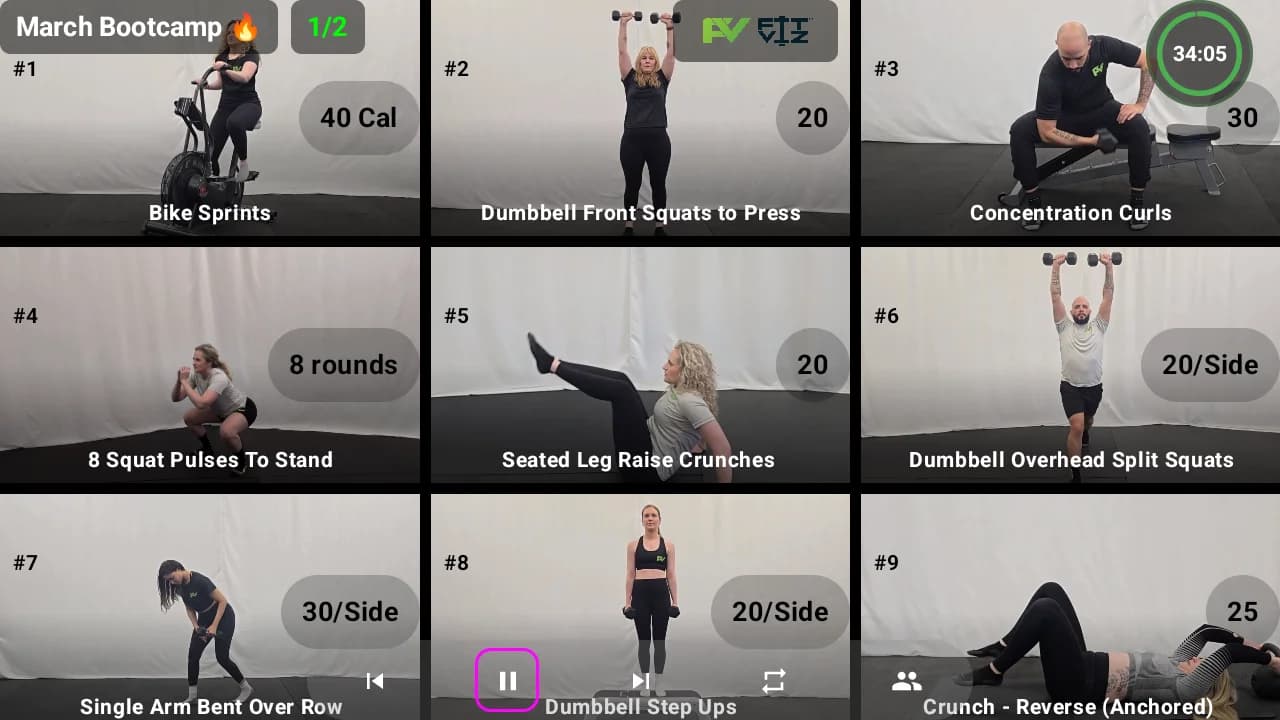
Fit Viz was built by coaches, for coaches, because we've lived the reality of running sessions while juggling too many tools and too much manual work. The mission is simple: empower fitness pros with a unified, visual-first platform that streamlines operations, enhances coaching, and elevates engagement - so trainers can focus on coaching, connection, and results.
Trusted by gyms and coaches
What Is a Workout Display (and what a Gym Workout Display is not)
A Workout Display is a screen-based system that shows members exactly what to do - clearly and continuously - so classes run smoother and coaching gets sharper. A Gym Workout Display (also searched as workout screen, workout TV, digital whiteboard, smart displays, or gym screen) is built for the training floor, not the front desk.
A Workout Display is not:
- “A TV with a slideshow”
- “A coach’s phone timer mirrored to the wall.”
- “A whiteboard you still have to rewrite every day.”
- “Digital signage pretending to run class.”
A true Gym Workout Display combines workout delivery and clarity in a way that the gym class can follow at a glance:
- 01
Movement demonstrations (so members stop guessing)
- 02
Timers that match real training formats (intervals, EMOM, AMRAP, Tabata, rounds)
- 03
Workout structure (warm-up → main block → finisher → cooldown)
- 04
Coaching cues + scaling (so beginners and advanced athletes both win)
- 05
Performance context (including heart rate zones on screen)
That’s why Workout Display is a category, not a decoration - and why the best Gym Workout Display setups feel like “the gym class runs itself.”
Workout Display vs digital signage vs “just a TV” (the category breakdown)
This is the confusion that drives bad purchases.
Digital signage is marketing. Workout Display is workout delivery.
Digital signage supports:
- Promos
- Announcements
- Schedules
- Brand visuals
A Workout Display supports:
- Movement demos
- Training timers
- Station flow
- Coaching cues
- Heart rate zones
- Reliable workout delivery
“Smart TV + casting” isn’t gym TV software
Most gyms try consumer Smart TV workflows first. Then they hit:
- Unreliable casting
- Wrong inputs
- Staff confusion
- Inconsistent layouts
- No timer integration
- No workout structure
That’s why gym TV software exists, and why gym display software is a real category.
Why whiteboards fail at scale (and why workout delivery wins retention)
Whiteboards work when the gym class is small and simple. But the moment you scale - more members, more stations, more coaches, more classes - the cracks show up fast.
Lost Minutes, Lost Momentum
Inconsistent Delivery, Inconsistent Brand
Confusion Kills Confidence
Higher Form Risk
Coach Burnout
Consistent Quality: 5 AM or 8 PM, it hits the same
A Gym Workout Display standardizes the baseline: the same movement demo, the same sequence, the same timer, the same coaching cues, the same stimulus. That consistency is workout delivery at scale - and it’s what makes your brand stop depending on who’s coaching and start depending on your system. For facilities worried about member retention, this is the unlock.
We gained back 6–8 minutes per gym class because members stopped asking what's next.

Becky
Kratos Studios
Our coaching got better overnight - coaches weren't glued to the whiteboard.

Drew
Transformation of Ascension
The gym room instantly felt more premium.

Frank
NDB Fitness
What a great Workout Display should show
A great Workout Display answers four questions instantly:
A great Gym Workout Display does that without clutter, tiny fonts, or “nice visuals” that don’t help execution. (That’s also why Workout TV UX matters.)
- 01
Movement demonstrations (visual instruction that actually works)
A Workout Display should show movement demonstrations as looping visuals so members can glance and go - especially in group fitness when one coach can’t re-demo for every station. This is the base layer of workout delivery.
What “good” looks like:
- Looping demo clip
- Equipment setup visual
- 1–2 coaching cues (clean, not paragraphs)
- Scaling options (where appropriate)
- 02
Timers that match real training (not just a countdown)
A Gym Workout Display must support the formats your gym actually runs:
- Intervals + work/rest
- EMOM + AMRAP + Tabata
- Rounds for time
- Station circuits and rotations
- Countdown + count up where needed
A Workout Display becomes the “rhythm engine” of the gym class when the timer matches the workout structure.
- 03
Flow + sequence (the difference between screens and systems)
This is where a Workout Display becomes a coaching assistant:
- Station number + movement + target
- “Next station” preview
- Round tracking
- Rotation prompts
Flow matters most in group fitness stations, HIIT circuits, and functional training blocks.
- 04
Coaching cues + scaling (where workout delivery becomes inclusive)
Great workout delivery means your Gym Workout Display supports multiple levels without turning the screen into chaos:
- RX option
- Scaled option
- Substitution option (if needed)
- Key technique cue
- Target intensity cue (especially with heart rate zones)
- 05
Heart rate zones (performance context on the screen)
A Workout Display that can show heart rate zones on screen adds a performance layer most systems don’t have. More on this below (and yes - we’re going to press this differentiator hard).
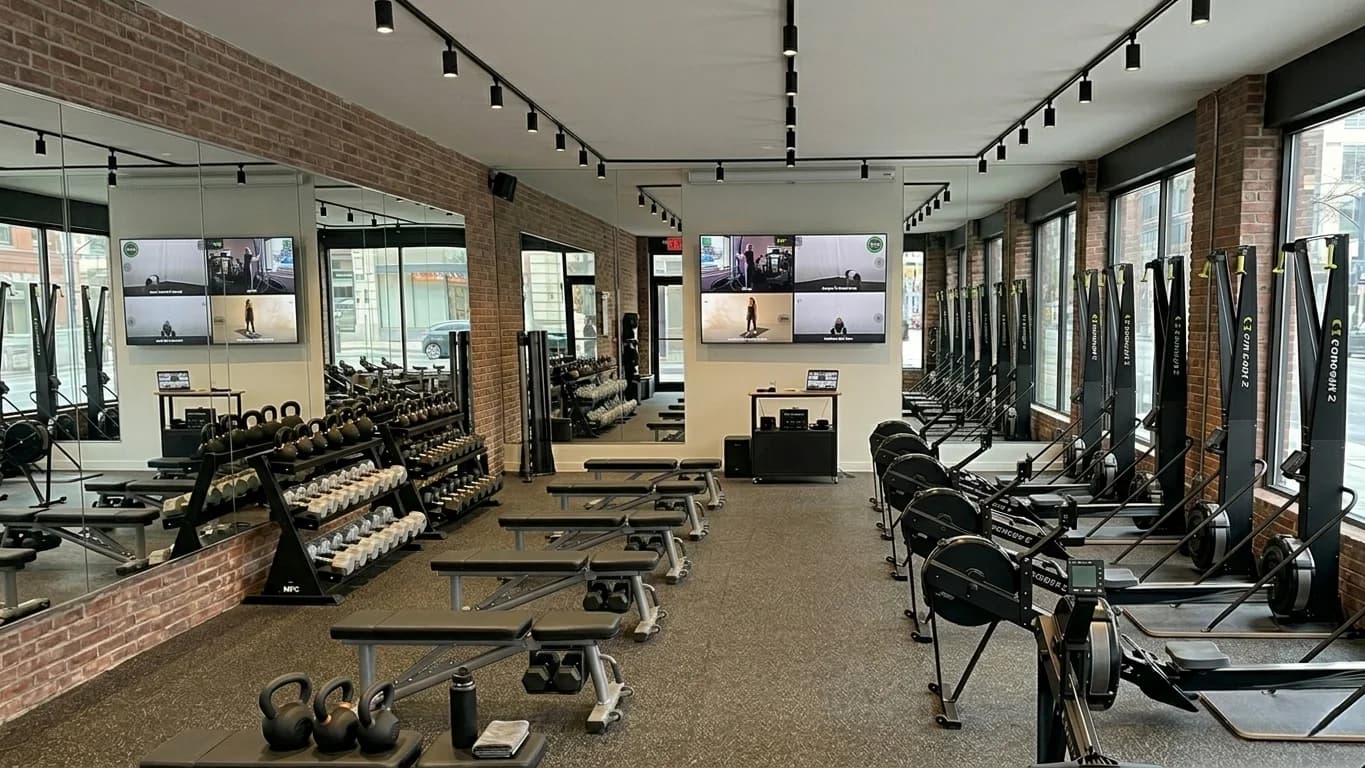
What software runs a Gym Workout Display? (gym display software + gym TV software)
This is the category question most gyms ask once they move past “buy a TV.” They’re really asking: What software runs a gym workout display reliably, every day, for every coach? A complete workout delivery system layers three roles: gym display software, gym TV software, and workout screen software.
1. Gym display software
(what it needs to do)
Gym display software needs to do more than “show content.” It needs to run the class.
A strong gym display software platform supports:
- Structured workouts (blocks, stations, timers)
- Instant edits (because real classes change)
- Consistent layouts (so members don’t re-learn your screen every day)
- Performance overlays (like heart rate zones)
- Brand control (your gym, your vibe)
If your “gym display software” can’t handle timers, stations, and real-time workout delivery, it’s not really gym display software - it’s signage.
2. Gym TV software
(how it’s different from a normal Smart TV)
Gym TV software exists because consumer TV setups fail in gyms: wrong apps, wrong controls, unreliable casting, and no standardized class workflow. Real gym TV software adds a “brain” to your screens - workouts, timers, zones, and branded layouts - so the TV is part of your training system.
If you’re evaluating gym TV software, look for:
- A coach-friendly control workflow
- Fast load times
- Consistent display across TVs
- Options for multi-screen control (more on that in the setup guide)
3. Workout screen software
(the “floor execution” layer)
Workout screen software is the piece that makes the training floor feel coached and premium:
- Station grids
- Movement demos
- Interval timers + transitions
- On-screen cues
Fit Viz is built as workout screen software - not just a scheduling tool and not just a signage tool - because it’s designed for the training floor where the experience is won or lost.
(You’ll see “gym display software,” “gym TV software,” and “workout screen software” overlap - because they’re all describing the same outcome: a Gym Workout Display that runs the gym class.)
Read more on the difference between Gym Digital Signage vs Gym Workout Display
Who uses Gym Workout Displays?
A Gym Workout Display isn’t “just for CrossFit.” The buyer segments are broader, and each segment has different priorities for workout delivery.
1. Boutique fitness studio
A boutique fitness studio wins on experience: clean class flow, premium visuals, and consistent coaching cues. A Workout Display helps a boutique fitness studio reduce confusion for new members and keep pace tight in group fitness formats.
If you run a boutique fitness studio and want screens + signage strategies, start here.
2. CrossFit gym
A CrossFit gym needs a Gym Workout Display that handles stations, intervals, EMOMs, AMRAPs, and whiteboard replacement - plus performance and community energy. This is where Workout Display becomes the “WOD execution layer.”
3. HIIT studio
A HIIT studio depends on timing, transitions, and station clarity. A Workout Display in a HIIT studio makes the gym room feel like a machine: next move preview, crisp interval timer, and consistent rotation prompts - especially when music is loud, and fatigue is high.
4. Group fitness classes
Group fitness succeeds when people can follow without stopping the coach. A Gym Workout Display improves group fitness execution because members can glance up and keep moving. In group fitness, screens are not hype - they’re clarity.
5. Strength and conditioning coach
A strength and conditioning coach often runs sessions with mixed skill levels and multiple stations. A Workout Display helps a strength and conditioning coach deliver strength circuits, speed work, and conditioning intervals with consistent pace and clear targets - without losing time to explanation.
Use cases: 12 high-impact ways to run classes better with Workout Display
This is where “nice screens” becomes “better business.” The goal is not to change your training style. The goal is to upgrade workout delivery so the class runs cleaner, safer, and more consistently.
Class Formats
1. HIIT + interval classes (fast transitions, crisp pacing)
A Workout Display is perfect for HIIT: interval timers, “next move” preview, demo loops, and rotation prompts. This is one of the fastest ways to improve the flow of a group fitness session.
2. Strength training sessions (rep schemes + rest timers + targets)
Strength training benefits from clarity and consistency:
- Rep scheme on screen
- Weight targets or RPE guidance
- Rest timer that actually runs
- Coaching cues for technique focus
In strength training, a Gym Workout Display reduces setup confusion and keeps the whole gym class on the same clock. Strength training runs more smoothly when members can glance up mid-set for confirmation rather than asking the coach. Strength training also scales better across coaches when the screen standardizes the plan.
(Yes - strength training deserves screens, not just conditioning.)
3. Strength circuits + functional training blocks (complex lifts, safer form)
In functional training, movement complexity rises: kettlebell flows, barbell complexes, mixed modalities, carries, sleds. A Workout Display supports functional training by showing demo loops, 1–2 cues, rep targets, and setup reminders.
Functional training is where visual clarity prevents sloppy reps and rushed setups. A Gym Workout Display makes functional training safer and faster.
4. Bootcamp-style stations (rotation clarity)
Bootcamps win or lose on rotations. A Workout Display shows:
- Station numbers
- Countdown timer
- Rotation prompts
- Next station preview
This is workout delivery as choreography - without the coach playing traffic cop.
Training Contexts
5. Team training/athlete sessions (drill accuracy + intent targets)
Teams need precision: drill demos, work/rest timing, and intent cues (“push pace,” “recover,” “Zone 2 base”). A Gym Workout Display keeps the group synchronized and gives the coach room to coach.
6. Group fitness classes with mixed levels (coaching cues + scaling)
In group fitness, you need scaling options without slowing the gym class. A Workout Display supports “RX / scaled / alternative” in a consistent spot so beginners feel included and experienced members feel challenged - without the coach repeating everything.
That's a workout delivery that respects every member in the gym room.
7. Open gym environments (self-serve clarity without chaos)
An open gym is where screens shine quietly. In an open gym, members train independently - but they still benefit from:
- Movement demos
- Timers for intervals or rest
- Optional skill practice flows
- Technique cues on demand
A Gym Workout Display in an open gym can show templates, skill tracks, or “today’s focus” content without needing a coach to explain every detail. In an open gym, a Workout Display becomes your silent coach.
8. Personal training on the floor (premium 1:1 + small group delivery)
Even in 1:1, screens upgrade workout delivery. A Workout Display can show the plan, timing, and demo loops so the coach spends less time explaining and more time correcting.
Fit Viz even frames this as part of modern coaching systems and Workout TV experiences.
Specialty
9. “F45-style” circuits (station grids + synchronized transitions)
If you want a “screen like F45,” the requirements are clear: synchronized station videos, a global clock, previews/transitions, and a coach control layer. Fit Viz has content directly addressing this kind of Gym Workout Display use case.
10. Skill sessions + technique clinics (exercise demos at scale)
Skill days work best when the gym class can re-watch the movement standard without stopping class. A Workout Display helps members self-correct and keeps the coach focused on the gym room, not the board.
11. New member onboarding / Foundations (confidence + safety)
A Gym Workout Display improves onboarding because it reduces intimidation. Seeing the movement demo and workout flow on screen helps new members feel like the gym class is guided, not chaotic.
12. Competitions + in-house events (timers + standards + hype)
Events need clear clocks, heat structure, movement standards, and pacing cues. A Workout Display can unify the experience across heats and stations.
From group fitness classes to open gyms, every format benefits from a screen that keeps delivery clear.
If your classes are strong but your delivery is messy, this is your sign. Fix workout delivery first - because it’s the fastest upgrade members actually feel.
Movement library: exercise video + exercise demo delivery that members actually use
Your Workout Display is only as helpful as what it shows. That’s why the movement library matters.
Exercise video loops
Exercise demo angles
Scaling + signature moves
Display exercise videos and exercise demos so members see exactly how each movement should look
A modern Gym Workout Display should display exercise videos and exercise demos so members see exactly how each movement should look - especially in group fitness when one coach can’t re-demo each station. You reduce guessing, reduce injury risk, and keep the flow moving.
Here’s what “movement library done right” looks like in a Workout Display:
- Exercise video loops that are easy to glance at mid-set
- Exercise demo clips with clear angles and clean tempo
- Equipment setup visuals
- 1–2 technique cues (not a lecture)
- Easy scaling swaps
And yes, your gym should also be able to upload signature movements or branded demos. A Workout Display should match your brand, not force you into generic templates.
Related reading:
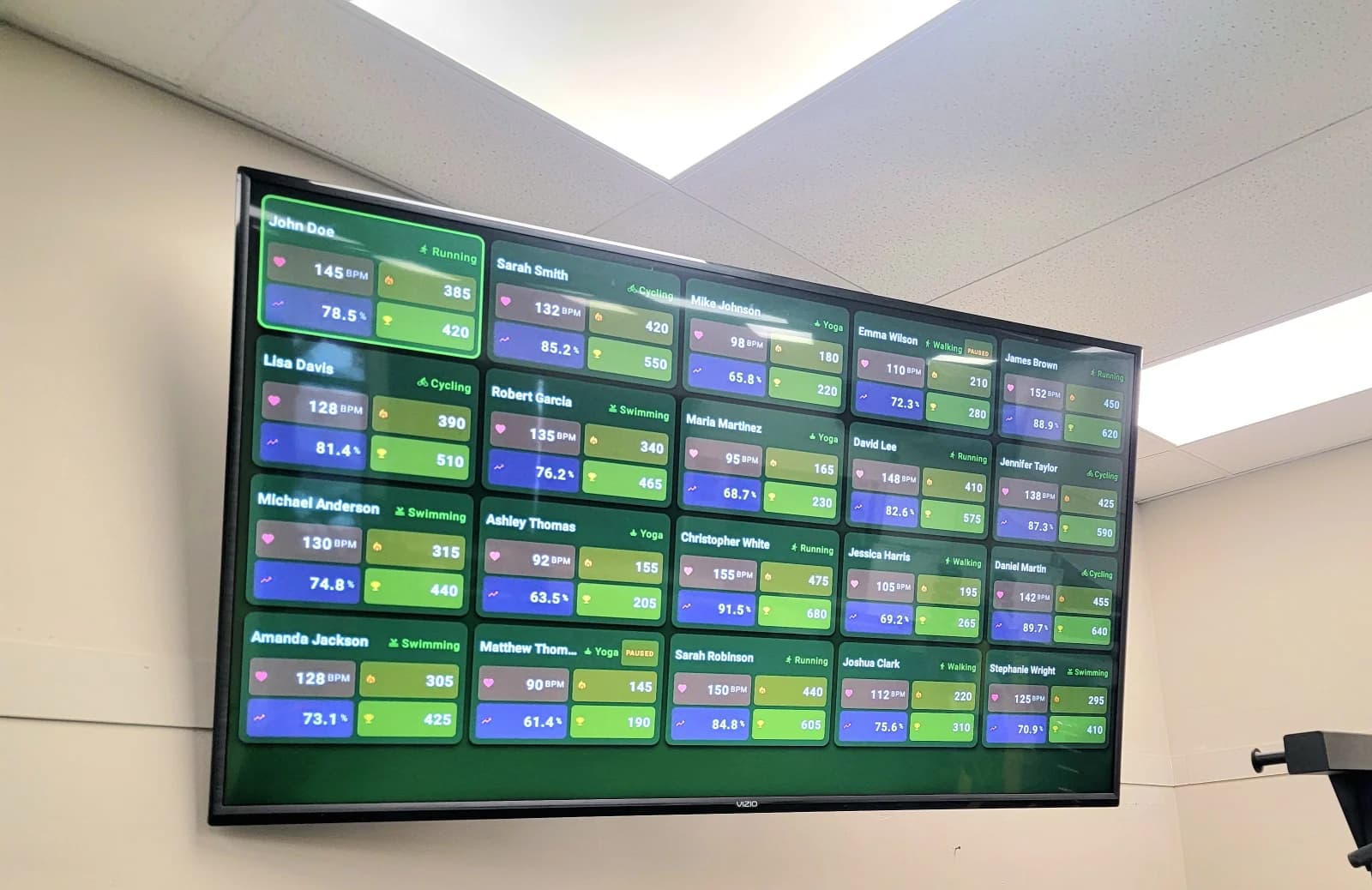
Heart rate zone display - the feature that other display platforms don’t have
Here’s the moat most gyms aren’t exploiting yet: heart rate zones on their gym display.
A heart rate zone display turns intensity into something visible and coachable. Instead of “go harder,” coaches can cue: “push Zone 4 for 60 seconds” or “recover to Zone 2.” That’s zone-based training made simple in real time.
Most Workout Display and Gym Workout Display platforms stop at demos + timers. A heart rate zone display adds a performance layer that changes the perceived value of your training - because effort becomes measurable, not guesswork. That’s why heart rate zones are a genuine differentiator in the workout screen software category.
And yes - this is exactly the feature that a lot of “other display platforms” don’t lead with or ship as a core, integrated experience. Fit Viz does. (Translation: your Workout Display becomes a training system, not a slideshow.)
How a heart rate zone display improves workout delivery
Coaches cue effort targets instead of generic intensity.
Members self-regulate safely across mixed levels.
Zone-based training becomes consistent across coaches.
Group fitness sessions feel more personalized.
Retention improves because members can “see progress” week to week.
Deep dive: Heart Rate Zones — The Complete Guide
Zone-based training + effort tracking (simple, scalable coaching)
“Zone-based training” doesn’t need to be complicated. With heart rate zones on screen, you can run:
- Zone 2 base days
- Zone 4 interval days
- Recovery-focused sessions
- Effort-based challenges (without unsafe competition)
That’s effort tracking turned into real coaching.
Setup guide: placements, reliability, and multi-screen layout strategies
You don’t need a complicated AV buildout. You need smart placement, stable playback, and a plan for how coaches will use it. This setup guide is the difference between “we mounted a TV” and “we built a Gym Workout Display system.”
Before you mount anything, answer:
- Where do members naturally face during work intervals?
- Which zones get blocked by racks/bikes/rigs?
- Where does glare hit at peak daylight?
- Do you run stations, lines, or pods?
Then decide: one screen, or multi-screen?
- Place the Workout Display where members naturally face during work intervals
- Mount high enough to see over benches, racks, and rowers
- Avoid glare from windows and overhead lighting
- Use larger screens where sightlines are long
- In large spaces, use multi-screen so nobody squints
Fit Viz TV placement guide for workout screens
Multi-screen layouts let you run different content on different screens across zones, stations, or rooms.
A multi-screen approach is how you scale a Gym Workout Display across:
- • Large single rooms
- • Multi-room facilities
- • Mixed modalities (HIIT + strength + cycle)
- • Separate stations vs coaching wall vs lobby
Examples of a multi-screen layout that actually improves workout delivery:
- Screen A: station grid + interval timer
- Screen B: movement demo (large) + coaching cues
- Screen C: heart rate zones, leader tiles, and effort tracking
- Screen D (lobby): digital signage + class schedule
That’s not “more screens for flex.” That’s multi-screen as a workflow tool.
Use multi-screen when:
- • Your gym room is wide/long and one screen isn’t readable
- • You run true station circuits
- • You want a dedicated “demo screen” + dedicated “timer screen”
- • You have open gym + class overlap
- • You want to separate marketing signage from the training floor
Multi-screen guidance that avoids chaos:
- • Keep one “primary” Workout Display screen that always shows the active block + timer
- • Use a second multi-screen surface for demos or zones
- • Use consistent positioning so members learn where to look
- • Avoid switching layouts mid-class unless it’s intentional
Multi-screen layout rule of thumb:
- • If your class has stations, consider a multi-screen layout.
- • If your facility has two gym rooms, consider multi-screen by room.
- • If you want zones + WOD clarity at the same time, use multi-screen.
(We refer to this as the multi-screen and multi-screen layout concept.)
- TVs: best for the main Gym Workout Display wall (readability + impact)
- Tablets: great for small gym classes, personal training corners, or backup stations
- Projectors: can work, but lighting and contrast become issues (test first)
The best Workout Display is the one that starts every time.
Reliability checklist:
- Stable internet (or stable local playback options)
- Dedicated device per screen (avoid “someone’s laptop”)
- Consistent power management (screens don’t sleep mid-class)
- Coach workflow that’s 1–2 taps, not 10 steps
- A backup plan (even if it’s “switch to static block view”)
If you’re evaluating the broader system, our Ultimate Guide to Gym Display Systems covers reliability, timers, screens, and how it connects your gym management software workflows.
If you can run a class, you can run a Workout Display - but only if you keep the UI simple and the workflow consistent:
- Open the day’s session
- Start the timer for the current block
- Advance blocks as needed
- Make quick edits if reality changes
- Reset for next class
That’s where workout delivery becomes repeatable across coaches.
Want your exact setup mapped? Tell us your class model, and we’ll recommend a screen plan.
Frequently Asked Questions
A Workout Display is a screen-based system that guides training in real time - showing movement demos, timers, stations, and coaching cues so members can follow without constant explanation. A Gym Workout Display improves workout delivery because the gym class stays synchronized and clear.
Gym display software is the software layer that runs a Gym Workout Display - not just showing content, but running class structure: workout blocks, station grids, interval timers, coaching cues, and (in Fit Viz’s case) heart rate zones on screen. If it can’t handle timing and flow, it’s not really gym display software.
No. A Gym Workout Display runs training (demos, timers, stations, coaching cues). Digital signage runs communication (announcements, promos, schedules). Many gyms use both - but they’re different jobs.
A workout timer only counts time. A Workout Display shows time and context - what to do now, what’s next, how to scale, and how to move. A Gym Workout Display is a workout delivery system, not just a clock.
The best interval timer is the one your whole gym class can read instantly, and that matches your training formats (intervals, EMOM, Tabata, rounds, stations). For most facilities, the "best" is an interval timer embedded inside a Workout Display because it keeps workout delivery aligned to the plan and reduces dead time.
In a strong Gym Workout Display, coaching cues appear as short, high-signal prompts next to the movement: 1–2 form cues, a pacing note ("smooth," "push," "controlled"), and scaling guidance ("scaled option," "sub option"). The point is to support the coach’s voice, not replace it.
Yes - because clarity increases confidence, and confidence drives consistency. A Workout Display reduces confusion, improves pacing, and makes sessions feel premium. Many gyms also use Workout Display screens as part of an engagement strategy (leader tiles, challenges, community moments), which supports member retention.
Fit Viz can show heart rate zones directly on the screen so effort becomes visible and coachable in real time. A heart rate zone display helps coaches cue zone-based training ("push Zone 4," "recover to Zone 2") and helps members self-regulate safely.
In most cases, yes - gyms typically use the TVs and screens they already own, then add the software layer that makes those screens a Workout Display system (rather than "random TV content").
Yes. In open gyms, a Workout Display can show self-serve flows: skill tracks, templates, rest timers, and optional movement demos. Open gym members get clarity without needing a coach to re-explain every session. An open gym also benefits from consistent timers and visible standards.
A multi-screen setup assigns different roles to different screens. A common multi-screen layout is: one main screen for workout blocks + timer, a second screen for movement demos, and a third screen for heart rate zones or leader tiles. Multi-screen is especially useful for stations, large gym rooms, and mixed modality zones.
Try Professional - Free 14 Days
Related Fit Viz articles
Display & Screens
Heart Rate
Engagement & Systems
- Engagement with Workout Screens: The future of motivation
- Gym Tech Stack: Workout Screens, Heart Rate Zones, and Class Scheduling
- Member Retention: Why Clarity Beats Motivation Alone
- Studio Software: Boutique Fitness Management Solutions
- Vagaro Alternative 2026: The Complete Guide for Gyms and Fitness Studios
- Fitness Scheduling Software: 10 Best Tools Reviewed (2026)
- Gym Member Management Software Comparison
- Group Fitness App Comparison: Top 10 Options Your Members Use
Gym Class Styles
- Workout Stations: How to Run Station-Based Training Without Confusion
- AMRAP, EMOM, and Tabata: Which Workout Format Is Best?
- DEKA vs MURPH Challenge: Which Test of Fitness Is for You?
- Workout Templates: How to Build a Weekly Workout Routine That Scales
- Hyrox Workout: Training and Preparation for a Hyrox Race
- Obstacle Race Explained: Spartan Race vs Hyrox
- CrossFit Gym Management Software: Top Picks
- Fitness Tech News: Cloud Fitness is the Core of Modern Training
- Personal Training Software Buyer's Guide
Ready to Replace Whiteboard Chaos
With a Real Gym Workout Display?
A Workout Display is not “nice visuals.” It’s how you build consistent workout delivery - so your Gym Workout Display runs the gym room, your coaches coach, and your members stop guessing.