The All-in-One CrossFit Affiliate Software
CrossFit Software That Runs Your Box, Not Just Your Front Desk
Fit Viz CrossFit software combines class booking, payments, member management, workout displays, integrated timers, performance tracking, and a branded crossfit gym app into one platform, built for how a box actually runs. Free booking and free payment collection as the starting tier.
Why One Platform
Affiliates have a unique software problem: most platforms force a choice between good operations and a good in-class experience. Wodify handles ops deeply. PushPress handles ops cleanly. But the workout display layer, the gym-floor experience members actually live in, is an afterthought everywhere else.
Fit Viz CrossFit software is built around the opposite principle: the in-class experience is the product. One system runs the front desk and the gym floor, so your coaches stop juggling a booking tool, a phone timer, a whiteboard, and a tracking app.
What's Included
Class Booking and Payments
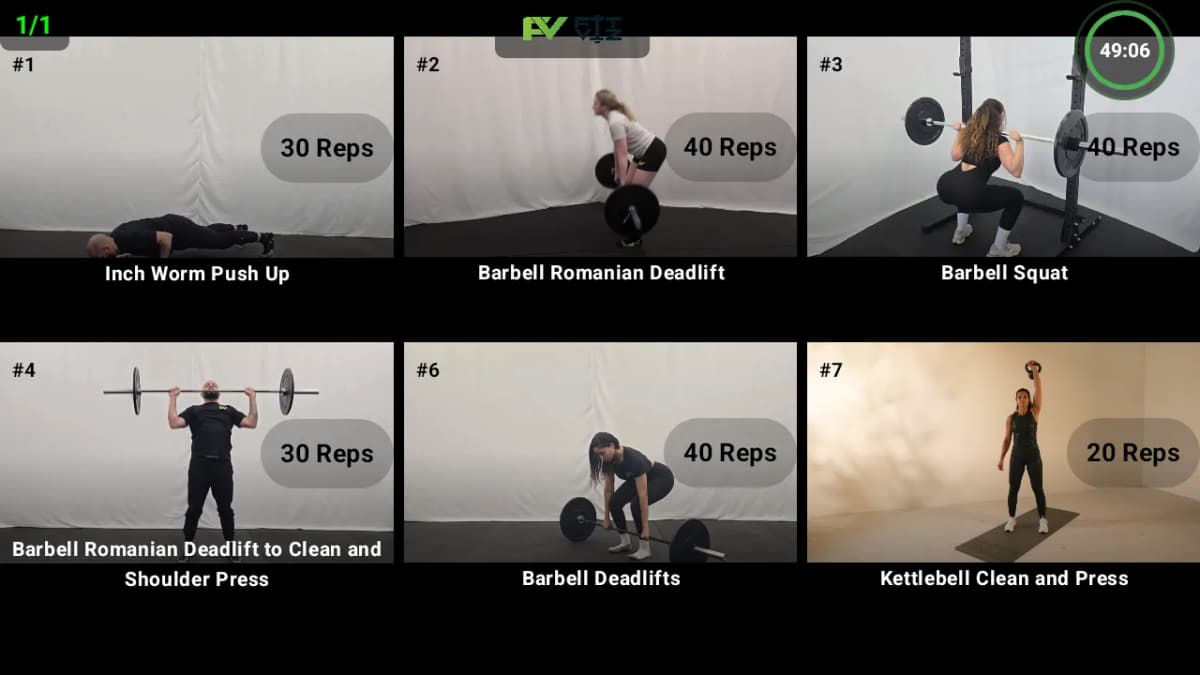
Workout Display and WOD Board
Integrated Workout Timer
Performance Tracking and Leaderboards
Heart Rate Zones
A Branded CrossFit Gym App for Members
Member Management
Multi-Location Support
Built for How a CrossFit Box Actually Works
Most gym platforms were built for salons, boutique studios, or big-box chains, then adapted. Fit Viz is purpose-built CrossFit box software: class-based, performance-tracked, community-oriented from the first line of code.
Class capacity that handles real CrossFit constraints
A class can be capped at 18 members, but if you only have 12 rowing platforms, the WOD that day capacity-caps at 12, not 18. Fit Viz handles equipment-aware capacity natively.
Programming that connects to delivery
The WOD you author today appears on your gym-floor display tomorrow. No manual copy-paste between programming and display tools.
Benchmarks and community
The CrossFit identity is built on measurable progress and visible community. Native benchmark tracking (Fran, Grace, Murph, Helen, Cindy, Annie, Diane, Elizabeth, Karen, Linda) and leaderboards are part of the core experience.
A free tier that fits new affiliates
Booking and payments are free. Pay only when you add AI retention, advanced reporting, or a branded CrossFit gym app, when your operation actually justifies it.
No marketplace pulling members elsewhere
Your members never see competing CrossFit boxes recommended in their booking flow.
Who Fit Viz Is For
New CrossFit Affiliates (Under 50 Members)
Established Boxes (50-200 Members)
Multi-Location Operators and Franchises
Hybrid Boxes (CrossFit + Hyrox + Bootcamp)
Affiliates Switching From Another Platform
How Fit Viz Software Compares to Others
We keep the sales page and the comparison content separate on purpose. For the full landscape, Wodify, PushPress, SugarWOD, Mindbody, BTWB, and Fit Viz across the CrossFit gym software category, read our best software for CrossFit comparison. For the operations and billing layer specifically, see the CrossFit gym management software guide.
The honest summary
- If integrated displays and timers matter to you, Fit Viz is the only platform with both built into the same system as booking.
- If you want a free starting tier, Fit Viz is the only option.
- If you want the longest CrossFit-specific operations history, Wodify still leads.
- If you want simple operations and tracking, PushPress is the cleanest non-Fit-Viz option.
Pricing
Free
Everything a new affiliate needs to run classes, no platform fee, no time limit.
- Class booking
- Payment collection (processor fees only, no platform fee)
- Basic member management
- Attendance tracking
- Core workout displays
Professional
Everything in Free, plus the retention, reporting, and branding tools growing boxes need.
- AI retention signals and at-risk prediction
- Advanced reporting
- Branded member CrossFit app
- Multi-location
- Priority support
Getting Started
Three ways to start
- Day 1
Sign up, connect your payment processor (Stripe or Payroc), import your class schedule.
- Day 2-3
We migrate active members and memberships for you.
- Day 4-7
Mount the first workout display, train coaches on timer modes, publish the member CrossFit app.
- Day 8-14
Run live classes through Fit Viz alongside any existing system.
- Day 15
Cut over fully, most affiliates report zero member-facing downtime.
Frequently Asked Questions
CrossFit software is the category of tools a box runs on - booking, billing, member management, programming, tracking, displays, and timers. Fit Viz combines every layer in one platform; for a category-wide comparison of the major platforms, see our full platform comparison.
Both. Members get a branded crossfit gym app - booking, score logging, PRs, leaderboards under your box's name - and owners get the full platform behind it: scheduling, payments, workout displays, timers, and reporting in one system. The app is the member-facing surface of the platform, not a separate product.
Yes - booking, payment collection, basic member management, and core workout displays are free; only standard Stripe or Payroc processor fees apply. The Professional tier adds AI retention, advanced reporting, the branded member app, and multi-location.
Fit Viz CrossFit software is the only platform with native workout displays and integrated timers in the same system as booking - Wodify treats displays as an add-on (Kiosk+), PushPress needs third-party integrations. Fit Viz also has a genuinely free starting tier; neither competitor does.
For a new box, the deciding factors are cost and setup speed. Fit Viz's free tier covers booking, payments, and displays with nothing to pay until you grow - which makes it the lowest-risk crossfit box software to launch on. Wodify and PushPress are strong platforms but start at roughly $150-159/mo from day one.
Yes. The Professional tier is built as multi-location crossfit affiliate software: centralized member database, location-aware scheduling, per-location reporting, and brand-level analytics across every site.
Yes - members, classes, schedules, active memberships, and payment details migrate free. Most boxes complete the switch in 1-3 weeks, running both systems in parallel for the first week.
Any modern TV, tablet, monitor, or projector with a browser. No proprietary hardware; most boxes start with a TV they already own. Members use FitVizPro on iOS or FitViz on Android on their own phones, alongside the FitViz Tv app on the display.
Yes - Fit Viz supports multiple class types and program tracks natively. Hyrox station displays, bootcamp circuits, and CrossFit WOD blocks all work in the same system. See our Hyrox training app coverage for hybrid box considerations.
Yes - native PR (personal record) tracking, the full benchmark library (Fran, Grace, Murph, Helen, Cindy, Annie, Diane, Elizabeth, Karen, Linda), workout history, and optional leaderboards, logged from the member app.
14 days of full Professional features, no credit card - or start on the Free plan with no time limit and upgrade only when you need the advanced features.
Related Posts
CrossFit Software
Tracking + WOD App
Display + Workout Timer
Booking + Operations
Run the Front Desk and the Gym Floor From One Place
Stop stitching five tools together. Fit Viz CrossFit software puts booking, displays, timers, tracking, and your member CrossFit gym app in one platform, free to start.