CrossFit Workouts: Tools for Managing CrossFit Affiliate Programming
Learn how to manage CrossFit Workouts and CrossFit Affiliate Programming with modern tools for scaling, timers, demos, and performance tracking. See how Fit Viz turns affiliate programming into a clear, screen-led class experience with built-in tracking and workout flow.
CrossFit Workouts: Tools for Managing CrossFit Affiliate Programming
Managing CrossFit Workouts at scale is no longer about writing a WOD on a whiteboard and hoping everyone catches the details. Modern affiliates run multiple class tracks, coach substitutions, capacity limits, and a wide range of abilities - all while members expect clarity, speed, and measurable progress. That's why the bar for CrossFit Affiliate Programming has moved beyond spreadsheets and static PDFs.
The right tools don't just store workouts. They help you deliver workouts - clearly, consistently, and in a way that improves class flow and retention.
This guide breaks down what tools are available for managing CrossFit Affiliate Programming and why Fit Viz is designed specifically to run the in-gym CrossFit experience while still tracking performance and supporting operations.
What "managing CrossFit Workouts" really means for affiliates
At an affiliate level, "CrossFit Workouts" management includes more than programming. You're managing:
- Workout delivery (members understanding what to do in real time)
- Scaling and safety (Rx, scaled, substitutions, level-based tracks)
- Time control (EMOMs, AMRAPs, intervals, rest, transitions)
- Coach execution (consistent delivery across coaches and class times)
- Member experience (confidence, clarity, reduced intimidation)
- Performance tracking (PRs, benchmarks, history, consistency)
- Operations (booking, rosters, check-in, payments, policy enforcement)
A system that only logs results or only schedules classes forces the gym into a patchwork of tools.
Tools affiliates use to manage CrossFit Affiliate Programming
1) Spreadsheets and shared docs
Many affiliates start here because it's flexible and familiar.
Pros
- easy to build workouts
- quick edits
- cheap
Cons
- not athlete-friendly during class
- scaling options are often buried or inconsistent
- no real-time timer + transitions
- no integrated tracking history or PR prompts
- workouts still must be manually rewritten for the room
Spreadsheets can store CrossFit Affiliate Programming, but they don't run CrossFit Workouts on the floor.
2) Whiteboards and printed sheets
Whiteboards feel "CrossFit traditional," but they break down quickly at scale.
Where they fail
- poor visibility from the back of the room
- constant rewriting and formatting inconsistencies
- hard to show Rx + scaled + substitutions cleanly
- no demos, no auto-timers, no guided transitions
- new members get lost and ask more questions
Whiteboards can't match modern expectations for clarity and consistency.
3) Workout tracking apps (phone-first platforms)
Phone-based workout tracking tools are strong for logging, leaderboards, and benchmarks.
Where they help
- athlete score history
- PR tracking
- community features
Where they fall short for managing CrossFit Workouts
- the workout still lives on a phone during class
- coaches still run timing separately (timer app or wall clock)
- movement demos and workout flow aren't optimized for "in-room execution"
- class control is still manual
Tracking is important, but it's only half the battle. The other half is delivering CrossFit Affiliate Programming in real time.
4) All-in-one gym management software (booking + billing first)
These platforms often solve the front desk: memberships, payments, scheduling, staff management.
Common gap Even when a platform manages operations well, many still stop at check-in. The workout experience remains disconnected:
- separate timers
- separate whiteboards
- separate demo sources
- inconsistent class flow across coaches
For affiliates, the "product" is the class experience. Managing CrossFit Workouts requires systems that support that product.
What affiliates should demand from CrossFit programming tools
Visual clarity (every athlete can see the workout)
If athletes can't see the workout, they can't execute it confidently. A modern CrossFit affiliate needs the WOD visible from anywhere in the room - large, clean, and organized by blocks.
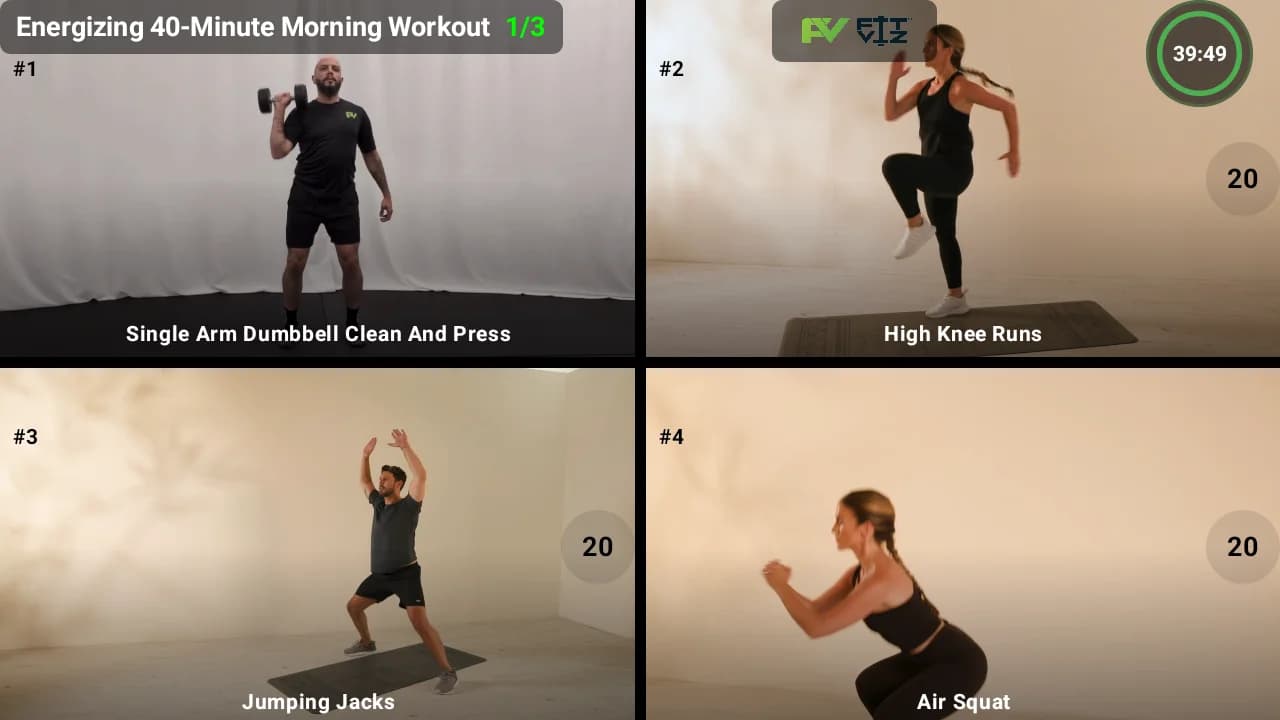
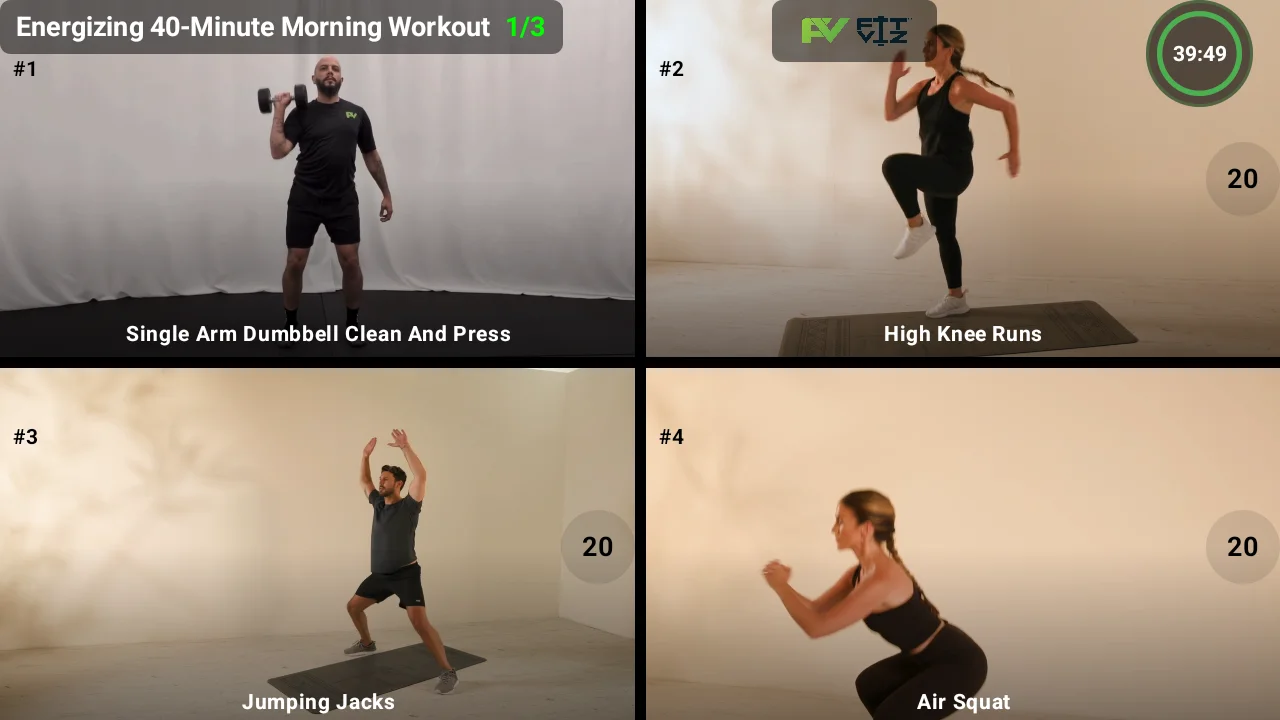
Fit Viz approach Fit Viz turns TVs into a workout command center so CrossFit Workouts are visible at all times - without clutter, rewriting, or "what's next?" interruptions.
Scaling options built into the workout display
Scaling is not a sidebar. It's core to CrossFit Affiliate Programming.
A system should support:
- Rx and scaled displayed side-by-side
- clear substitutions for common limitations (shoulders, knees, back)
- multiple tracks (beginner/intermediate/competitor) when needed
- standards and notes that coaches can reference quickly
Fit Viz approach Fit Viz displays workout options clearly so athletes self-orient faster and coaches spend less time repeating modifications.
Timers and transitions that run the room
Many CrossFit Workouts rely on timing precision:
- AMRAP and EMOM structure
- interval training
- station rotations
- rest periods and transitions
- time caps
A separate wall timer helps, but it's disconnected from the workout context.
Fit Viz approach Fit Viz integrates the workout clock timer into the workout display, so the timer sits next to the instructions and movement demos. Coaches start the class flow, and the intervals run automatically - reducing missed transitions and keeping classes on schedule. For more on how modern timer systems improve class flow, see our workout timer guide.
Movement demos that reduce coaching repetition
Even experienced athletes benefit from quick visual confirmation - especially in complex CrossFit Affiliate Programming with multiple movements, stations, and standards.
Fit Viz approach Fit Viz supports movement demos on the screen so the workout is not just text. This reduces "what does that look like?" questions and lets coaches focus on form correction rather than re-explaining the movement repeatedly.
Historical tracking that increases retention
The best performance tool isn't a graph. It's a prompt at the right time.
Athletes want:
- their last score on this workout or benchmark
- their recent PRs for key lifts
- visibility into progress over time
Fit Viz approach Fit Viz keeps workout history connected to your programming so athletes can see progress and stay engaged. When members recognize improvement, adherence rises - and retention follows.
Why Fit Viz is built for managing CrossFit Workouts at the affiliate level
Most platforms help with one slice of the problem:
- either the business side (booking, billing)
- or the tracking side (scores, PRs)
Fit Viz is designed to bridge both - because affiliates don't just need software that stores CrossFit Affiliate Programming. They need software that delivers CrossFit Workouts in the room.
Fit Viz helps affiliates by:
- displaying CrossFit Workouts clearly on high-definition screens
- showing Rx and scaled options side-by-side for accessibility
- running class timers and transitions as part of the workout flow
- providing movement demos that improve consistency and reduce confusion
- tracking athlete history and performance so progress is visible and motivating
- supporting the operational layer (rosters, check-in, and a connected class experience)
This turns CrossFit Affiliate Programming from static text into a guided, professional class experience that scales across coaches and time slots.
The bottom line: the new standard for CrossFit Affiliate Programming
In a modern affiliate, "good programming" is not enough. You need a system that makes the programming easy to execute for every athlete, in every class, with every coach.
Fit Viz helps affiliates run CrossFit Workouts with:
- better visibility
- better pacing
- better scaling clarity
- better tracking consistency
- better member experience
If your gym is still relying on spreadsheets and whiteboards to deliver CrossFit Affiliate Programming, the next upgrade isn't a prettier template - it's a platform that runs the room. Learn more about building the complete CrossFit technology ecosystem in our CrossFit software guide.